

After last month’s release of iOS 26.4, Apple is now beta testing iOS 26.5. The update will probably be rolled out to everyone next month. Here are all the details on the new features and changes for iPhone users with iOS 26.5.
Details for iOS 26.5
So far, Apple has only released iOS 26.5 beta 1. The update is available to developers and public beta users. iPhone users can head to the Settings app, select General, and then select Software Update to manage their beta registration.
I expect iOS 26.5 beta 2 to be released as soon as next week.
iOS 26.5 release date
As my colleague Ryan recently explained, iOS 26.5 will likely be released to the general public sometime in early May.
- iOS 18.5: Monday, May 12
- iOS 17.5: Monday, May 13
- iOS 16.5: Thursday, May 18
- iOS 15.5: Monday, May 16
iOS 26.5 features and changes
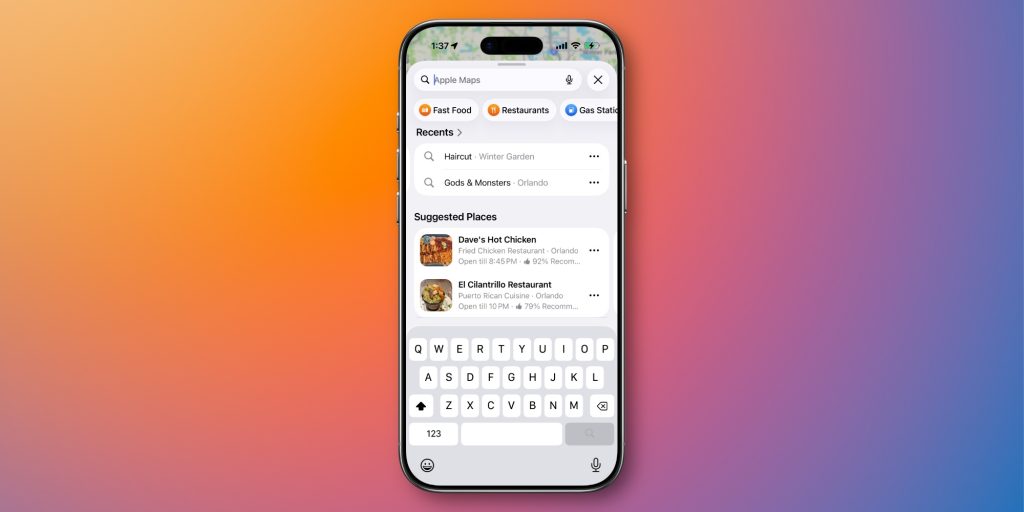
Apple Maps: Suggested locations, ads coming soon
Last month, Apple announced its plans to bring ads to Apple Maps this summer. iOS 26.5 builds on that change, adding the following text: “Maps can show local ads based on your approximate location, current search terms, or map view while searching.”
iOS 26.5 also enables a new suggested locations feature in Apple Maps. The feature, which you can see above, will “show recommendations based on what’s trending nearby, the user’s recent searches, and more.”
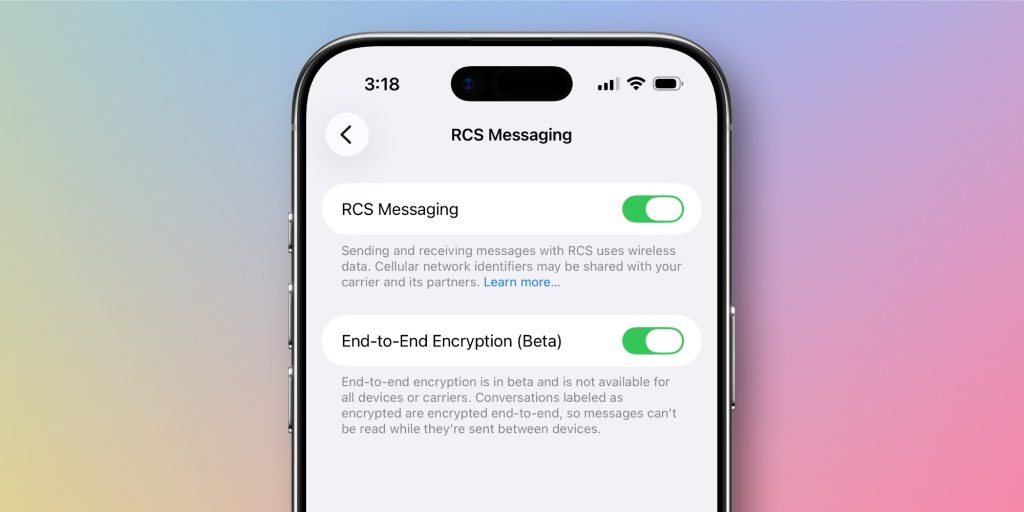
RCS encryption
Apple began testing end-to-end encryption for RCS messages with iOS 26.4. The feature, however, was not shipped as part of that update. Apple said it will come as part of the upcoming iOS 26 update.
With iOS 26.5 beta 1, RCS encryption is back in the Messages app. The feature is enabled by default. You can manage the option by going to Settings > Messages > RCS Messaging, where you will see the new “End-to-End Encryption (Beta)” switch.
Apple’s release notes for iOS 26.5 do not include any mention of this feature not shipping with iOS 26.5, unlike the iOS 26.4 release notes. We’ll have to wait and see to know for sure.
App Store purchase options
According to Apple’s developer release notes, iOS 26.5 will enable new purchasing options in the App Store. This will include an option that will allow developers to bill users monthly, but with a 12-month commitment. This is common in many other app store style platforms and many subscription services.
- “You can read the pricing details for monthly subscriptions with a 12-month commitment payment plan…”
- “You can specify the type of payment plan you can use for a subscription with a fixed 12-month payment plan…”
EU reforms
Stop me if you’ve heard this before: there are more changes for iPhone users in the EU. As part of iOS 26.5, Apple is testing Live Activities support for third-party services. This will allow accessories to receive and display Live Actions on the iPhone.
In addition, there is a continuous development of support for notifications and proximity matching of third-party services. A third-party audio switch is also in the works.
A wonderful pairing
With iOS 26.5, it’s now easy to pair a Magic Keyboard, Magic Trackpad, or Magic Mouse to your iPhone. If you connect one of those devices to your iPhone via USB-C, it will now stay connected via Bluetooth once you unplug it. You no longer need to pair it by activating the Settings app.
More changes for iOS 26.5
Finally, iOS 26.5 introduces several updates:
- New Inuktitut keyboard layout
- Apple Books Features: There are hints at new “Year In Review for 2026” features for Apple Books, including titles and awards for achievements like Loyal Reader, Reading Royalty, Power Reader, and more.
- Data Transfer Options: When transferring data from iPhone to Android, there are new options for sharing message attachments: None, 30 days, 1 year, or all.
iOS 26.5 rollout
As you can see, iOS 26.5 is a minor update compared to iOS 26.4. Internally, most of Apple’s attention is devoted to iOS 27 at the moment, which will be announced at WWDC in June.
Have you noticed any other iOS 26.5 changes? Are there any last-minute updates you hope Apple will make in iOS 26 before focusing on iOS 27? Let us know down in the comments.
My favorite iPhone accessories:
Follow the Opportunity: Threads, Bluesky, Instagram, and Mastodon.


FTC: We use auto affiliate links to earn income. More.
