


Visual Intelligence gets a big boost in iOS 27. Now it’s easier to find than ever, and there are new Visual Intelligence capabilities. Apple has also extended it to iPad and Mac, so you can use the same features on all devices.
Camera app
Apple has moved Visual Intelligence to the Camera app in iOS 27, and it’s accessible through a new Siri Mode that sits alongside Photo, Video, and other camera mode options. You can swipe to Siri Mode and take a picture so Siri can see what you see.
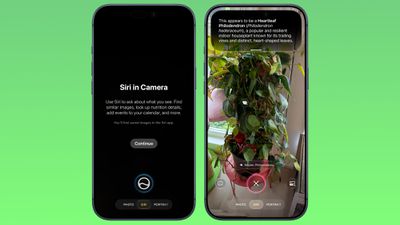
Siri will give you details about whatever you’re looking at when you swipe down, and you can ask follow-up questions.
Siri mode replaces Camera Control as the main way to access Visual Intelligence, but you can still get to it by pressing the Camera Control button.
Smart Suggestions
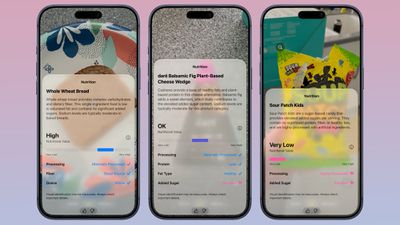
Siri Mode will suggest appropriate actions based on what you’re taking a picture of. If you take a picture of a plant, Siri will offer to identify it. If you take a picture of a plate of food, Siri can give you nutritional information.
Siri Integration
Visual Intelligence is integrated with Siri AI, and Siri can answer questions about what you’re looking at. Complex queries used to be forwarded to ChatGPT, but that is no longer necessary.
A smarter, more powerful version of Siri can do much of what ChatGPT can do, pull information from the web to answer questions.
New features of iOS 27 Visual Intelligence
- Understanding Nutrition – You can take a picture of a food or food item to check its nutritional value. Siri doesn’t tell you the specific calories in something, but it can tell you if what you’re eating is nutritious and what’s good or bad about it.
- Bill Breakdown (US only) – If you take a photo of the restaurant bill, you can split your meal and send money with Apple Cash. Or calculate what everyone owes and ask for money.
- Import Multiple Events – You can import multiple events into the Calendar or Reminders app at once from a schedule or list.
- Import Contacts – You can import your contacts into a business card image.
- Wallet Passes – You can change the barcode image from the membership or transfer it to the Wallet pass.
Visual Intelligence is more powerful than ever thanks to Siri’s ability to search the web for answers. It can read laundry labels and give you clear instructions, look things up and find reviews on the web, identify unusual appliances or cords and tell you what they do, cook scales, read ingredient lists to check for allergies, transcribe messy scribbled notes or lists into text, explain confusing parking signs, give plant care advice, solve any other problem it can do to think math.
Other Visual Intelligence Skills
Visual Intelligence has a long list of things it can be used for, and these options were available in earlier versions of iOS.
- Identify plants, animals, insects, landmarks, art, sculptures, books, and more.
- Add items to your calendar on paper like an event poster or flyer.
- Use Google Image Search to find similar images.
- Search Etsy, Amazon, Anthropologie, and other apps to find what you’re shooting with a camera.
- Provide information about the business in front of you, such as hours of operation.
- Translate, summarize, and read the text aloud.
Siri App Integration
All your Visual Intelligence Siri requests are saved in the Siri app so you can revisit them later. The Siri app can be set to save conversations for a month, a year, or forever.
Visual Intelligence on other Platforms
Apple has expanded Visual Intelligence in iPadOS 27, macOS Golden Gate, and visionOS 27. On a Mac, you can use the Command-Shift-Space keyboard shortcut to access Visual Intelligence and select a part of your display to ask a question about. On the iPad, you can access Visual Intelligence by taking a screenshot or by swiping up from the bottom left corner with the Apple Pencil.
In Vision Pro, you can use Visual Intelligence just by looking at something, including physical objects around you.
Device Requirements
Visual Intelligence in iOS 27 requires iPhone 15 Pro or later. For Mac, you need Apple silicon chip, and for iPad, you need Apple silicon chip or A17 Pro iPad mini.