


Apple has updated the Home app with some useful features that rely on Apple Intelligence. Updates improve the way HomeKit Secure video cameras work on the Apple HomeKit platform.
Apple Intelligence Snapshots
The Home app generates written summaries of motion alerts and what’s detected, using AI to determine what’s been recorded. It can detect people, animals, cars, packages, and general movement, providing a snapshot of what’s going on even if you’re not looking at the video.
It’s smart enough to provide information, so you’ll see alerts like “someone left the room,” “two people were in the room,” “the dog was sitting on the floor,” or “the cat played in the room.”
HomeKit Secure Video cameras are facially visible, so they can also see people in your photo library, sending alerts and snapshots with words.
Along with recording analysis, the Home app can now collect videos from different cameras capturing the same event. If a person walks through one camera and moves on to another, the Home app knows that the two events are related. During video playback, you can see related videos from multiple cameras with an overview of what happened throughout the home.
Highlights
If there are notable recordings available, they are displayed in a separate section above the regular recordings in the camera view.
Search
The Home app supports natural language search for camera images, so if you’re looking for something like when a package is delivered, you can search for it. It can see objects, colors, and more. Search works in the home app and directly in Spotlight.
Notification summaries
Real-time notification updates and related alerts are combined instead of being displayed as separate notifications. The net result is fewer notifications for the Home app. Snapshots can be turned on in the Home app settings for each camera, and there are options for multiple languages.
Video preview
Long-pressing an incoming video notification plays a preview clip of the video and includes access to nearby resources like lights you might want to turn on quickly.
Minimize Notifications
There’s an Apple Intelligence section in the Home app where you can turn on video snapshots and turn down notifications. Modifications to reduce Notifications include related activities such as the person arriving and opening the door.
4K Recording
HomeKit Secure Video cameras are no longer limited to 1080p recording. If supported, cameras can stream and record up to 4K.
Energy Monitoring
Devices that can track energy usage like smart plugs now display that information in the Home app on the Power tab. There is no way to automatically create based on data as of now.
Apple TV remote updates
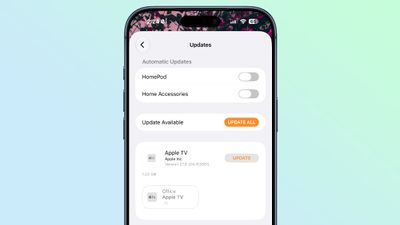
It’s now possible to update Apple TV remotely using the Home app, similar to how HomePod updates are done.
Honesty
Apple says HomeKit Secure Video capture and storage is more reliable than ever and less likely to miss a job.
Connectivity for Thread home accessories has also been improved with Apple adopting Thread 1.4, and HomeKit accessories now pair faster. Apple also says that innovation in smart home devices is faster than ever.
When adding a new device to the Home app, there’s a simple interface that’s useful for configuring Matter accessories in particular.
Compliance with Requirements
Apple Intelligence features in the Home app require a device that supports Apple Intelligence, which includes iPhone 15 Pro and later. Home features also require an Apple TV running tvOS 27 or a HomePod running HomePodse Software 27.
HomeKit Secure Video requires an iCloud+ plan. The 50GB plan supports one camera, the 200GB plan supports up to five cameras, and the 2TB and higher plans support unlimited cameras.
4K video recording does not require Apple Intelligence.