
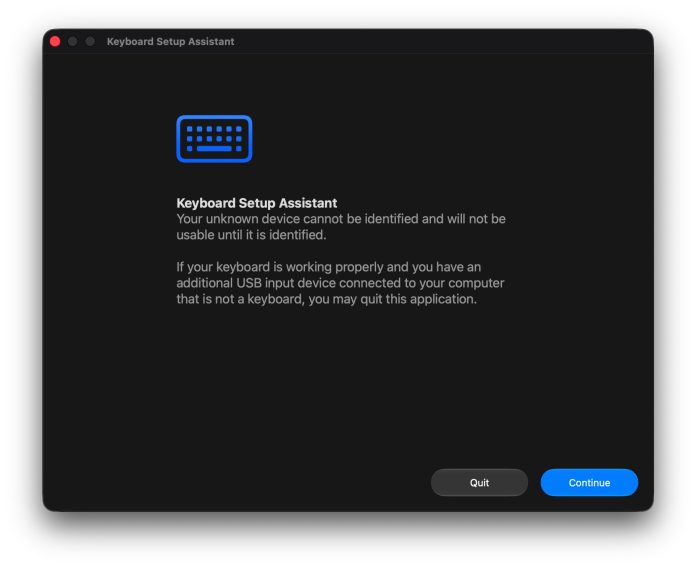


Some Mac users may encounter a strange situation where the “Keyboard Setup Assistant” application opens anywhere on their Mac, even if they have already connected and set up a keyboard for use with their computer. Keyboard Setup Assistant may appear completely randomly, when the computer is woken from sleep, when the computer has just restarted or restarted, or sometimes even when another Mac connected to Universal Control is woken from sleep, or woken from a screen saver. This can be a bit of a hassle, especially since it can happen even if the keyboard is already set up and used on a Mac.
Although this is annoying, the good news is that there are a few things you can try that can solve the problem of Keyboard Setup Assistant always popping up anywhere on a Mac. And usually, if the keyboard is already working as intended, you can just exit the Keyboard Setup Assistant and never see it again. Let’s learn more about this problem, and investigate some solutions to solve the problem.
What is Keyboard Setup Assistant anyway?
To start with the basics, you might be wondering what the Keyboard Setup Assistant is. Keyboard Setup Assistant is a built-in MacOS application that can be used to identify and set up keyboards. Not all keyboards connected to a Mac will trigger the setup assistant, but some keyboards will.
The way the app should work is when the Mac detects the new keyboard, Keyboard Setup Assistant opens, and asks you to press the key next to the Shift key on the left (which is Z on a US English keyboard). This is so that macOS knows what keyboard layout you are using, and can set the keyboard correctly.
Most Mac users won’t even see this app even if they connect an external keyboard, because for Apple Keyboards and many third-party keyboards, simply connecting to Bluetooth and pairing properly is enough. But if you see the Keyboard Setup Assistant, you usually only need to press the key once, and the application does not return.
Why does the Keyboard Setup Assistant keep popping up randomly?
There isn’t always a single cause for this, but there are several situations that can trigger the Keyboard Setup Assistant to appear randomly, or repeatedly, on a Mac.
For example, if you are using a third-party USB keyboard, or a third-party Bluetooth keyboard, you may see the Keyboard Setup Assistant. If the wireless keyboard reconnects itself after sleeping, it may start the setup assistant to restart. If another Mac using Universal Control to share the keyboard and mouse is woken from sleep or a screensaver, it may also activate the Keyboard Setup Assistant. Some USB hubs, KVM switches, USB keyboards, and/or powered docking stations may disconnect or reconnect, and that can trigger the setup wizard. Also, if you’re using a fancy mechanical keyboard, or a gaming keyboard, it’s possible that the keyboard doesn’t fully display itself the way Apple’s keyboard does, and that might trigger the Keyboard Setup Assistant to verify the layout.
There is also a chance that there is a bug or problem with the keyboard preferences, or a Bluetooth pairing problem, to cause the Keyboard Setup Assistant to appear automatically.
You may also encounter this issue when using many different versions of macOS on a network where you share a keyboard and mouse with Universal Control, although this problem does not seem to be limited to any particular version of macOS (FWIW I have encountered this situation in many versions of macOS over time, including macOS 27 Golden Gate).
Troubleshooting Keyboard Setup Assistant Appears Randomly on Mac
There are a few tricks to try and dismiss this if you keep seeing it pop up on your Mac:
- Go back to the Keyboard Setup Assistant as instructed on the screen, this sometimes solves the problem permanently
- Exit the Keyboard Setup Assistant if the keyboard is already working, this usually makes the problem go away
- Replace the keyboard batteries, or fully charge the keyboard battery. One of the most common reasons for the Keyboard Setup Assistant to pop up randomly involves any possible short disconnection and reconnection, whether that comes from battery drain, waking up from sleep, screen saver activation, USB-C dock or hub power, or similar.
- Try disconnecting and reconnecting the keyboard, whether it’s USB or Bluetooth
- Try restarting the Mac
- If you’re using a shared keyboard across multiple Macs, try restarting the host Mac (ie; the Mac the keyboard was originally connected to)
- Try temporarily disabling third-party keyboard utilities or tools that may affect connectivity
- If you’re connecting a USB keyboard through a USB hub, try connecting it to the Mac directly instead
- Install any available macOS system software updates to address any potential bugs or known issues with keyboards
- If you are using third-party keyboard software, install any available updates for that
You can also try to solve the problem by using a different keyboard connected directly to the Mac, because if the problem continues to appear with a new and different keyboard, it is probably something with MacOS itself and not the keyboard.
The Keyboard Setup Assistant shouldn’t appear every time, let alone do it anywhere, so if you encounter this kind of weird problem, use the more detailed troubleshooting and suggestions. If it continues to happen regularly, it could be a hardware problem with the keyboard itself or the attached USB hub, but that’s rare. Usually, this issue resolves itself by charging/replacing the keyboard’s batteries, directly connecting or pairing via Bluetooth to a Mac, or simply going through the setup assistant, or dismissing it if the keyboard is already working as intended.
Have you experienced this problem with Keyboard Setup Assistant before? Did you find the root cause, or use one of the simple solutions described here? Did you find another solution? Share your experience in the comments.