
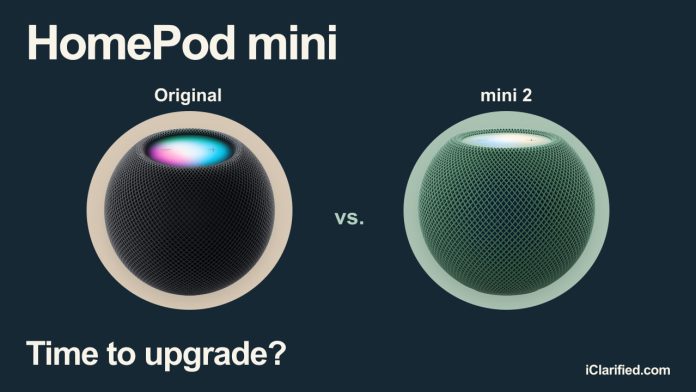

HomePod mini 2 gives Apple’s smallest speaker a bigger role at your desk and around your TV. It can stay connected as a compatible Mac’s default speaker or join a four-speaker surround system, two reasons to upgrade if you own the original mini.
The $149 model also promises a more conversational Siri AI, but that update still hasn’t arrived. If music, timers, and controlling the lights are all you use your mini for, you can keep the one you have.
Same Size, New Colors
HomePod mini 2 fits in exactly the same space as the original. It is still 84.3mm tall and 97.9mm wide, and weighs 10 grams less. The finishes are white, pink, green, blue, and midnight.

Inside, an S10 chip replaces the original’s S5. Both models use a full-range driver and two passive radiators, with computational audio adjusting playback in real time. Mini 2 has three microphones instead of four.
Speakers for Your Mac
HomePod mini 2 can stay selected as a compatible Mac’s default speaker for movies, games, and video calls. You can use one mini 2 or a stereo pair; Apple describes the new connection as more responsive and reliable than before.

Your Mac needs Wi-Fi 6E or later for this feature. A model with Wi-Fi 6 does not qualify, even if it has Apple silicon. Second-generation full-size HomePods also support it. Our HomePod speakers for Mac guide covers compatible models and setup.
The original mini can still receive Mac audio through AirPlay. That’s fine for sending over music occasionally. Mini 2 is more appealing if you want wireless speakers that stay connected for all of your Mac’s audio.
Four HomePods Around Your TV
HomePod mini 2 can join a four-speaker surround system with the fourth-generation Apple TV 4K. You can use four mini 2s, or put two second-generation full-size HomePods at the front and two mini 2s behind you. The speakers must match within each pair, and the system automatically adjusts timing and levels for their positions.

Original minis cannot join that surround system or form a stereo pair with mini 2. Stereo pairing requires the same model and generation, though you can still play music across both generations using multiroom AirPlay.
At $149 each, two mini 2s add $298 to a surround setup. You also need the fourth-generation Apple TV 4K and a compatible front pair. Our four-HomePod surround guide breaks down the supported combinations and total cost, including a system bought entirely from scratch.
Siri AI Is Coming Later
Siri AI is still a future free update for HomePod mini 2, with no announced release date. It is designed for back-and-forth conversations and personal requests, such as finding a song a friend mentioned in Messages. No Siri AI update has been announced for the original mini.
When the update arrives, the home’s owner will need an Apple Intelligence-capable iPhone or iPad with the latest software and Siri AI enabled. Other household members can then ask general questions without an eligible device of their own. Requests about their personal information will need their own paired, compatible device with Siri AI enabled.
The announced rollout is in English in the U.S., Australia, Canada, India, New Zealand, Singapore, South Africa, and the UK. Some server-based features have daily usage limits, with expanded access planned for a fee. Our Siri AI availability guide explains what works on Apple’s home devices now. If better Siri is your main reason to upgrade, wait for mini 2’s update.
Sound Glow and Smart-Home Features
Sound Glow works on both generations of HomePod mini with HomePod software 27.2 or later. The top lights up in colors drawn from the song’s artwork and pulses with the music, while soundscapes such as rain get their own animations.
You can turn Sound Glow on or off in the Home app’s settings for that speaker. It stays off while you watch video. On mini 2, controlling Sound Glow by voice requires an Apple Intelligence-capable iPhone running the latest software.

Mini 2 moves to Wi-Fi 6E and Bluetooth 6, up from 802.11n Wi-Fi and Bluetooth 5.0. Both generations retain Thread, Ultra Wideband for compatible iPhone proximity features, and temperature and humidity sensors. Both can also act as an Apple Home hub for your accessories and automations.
Sound Recognition is shared, too. Either mini can notify you when it recognizes a smoke or carbon monoxide alarm, though it is not a substitute for an alarm or emergency system.
Price and Specifications
HomePod mini 2 is available now for $149, including the midnight model at B&H. At our November 15 check, Walmart lists the original mini in midnight for $129, a $20 saving.
Should You Replace Your Original Mini?
Keep an original mini that works well as a room speaker or home hub. It now has Sound Glow, too. We’d upgrade for a pair beside a compatible Mac or behind the sofa in a supported surround setup, rather than replace every mini in the house.
For a first-time buyer, mini 2’s Mac and TV audio features justify the current $20 premium. The original is worth buying if you need a second one for an existing stereo pair, or find a substantial discount and only want a small speaker for music and smart-home control.
You can buy HomePod mini 2 at B&H or compare the mini 2 and original mini on our Apple Home Price Tracker. It shows current pricing and availability across tracked retailers.