Fosi Audio VOL20 Review – HiFiReport
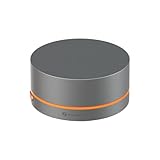
There is a specific frustration that anyone who has ever sat at a computer with music playing knows: the moment a track gets too loud, or you want to pause without reaching across the desk, and you end up hunting for a keyboard shortcut or fumbling for your phone. The Fosi Audio VOL20 proposes a simple, tactile solution to that problem — a 55mm CNC-machined zinc alloy puck that sits on your desk, connects to your computer or phone via Bluetooth or USB, and puts volume control, track skipping, and play/pause back under your fingertips exactly where knobs have always lived. It is a budget-friendly desktop accessory that several independent reviewers have described, with only slight exaggeration, as a quality-of-life revelation for music listeners who spend their day at a desk.
The market for Bluetooth multimedia controllers has historically been divided between minimalist USB knobs for PC productivity use and the extravagant control surfaces used in professional audio production. The VOL20 sits confidently between those extremes. It is not a professional production tool, and it is not a cheap plastic widget — it is a considered, well-built desktop companion with wireless connectivity, customizable RGB lighting, and a satisfying rotation feel that reviewers consistently compare to the oversized volume knobs on vintage hi-fi receivers. In a segment where competitors include basic knurled-metal knobs with no wireless functionality and proprietary gaming peripherals with unnecessary feature bloat, the VOL20 offers an unusually clean and versatile option.
User reception has been broadly positive. The VOL20 holds a strong average rating across multiple retail and community platforms, with reviewers who work from home, gamers who want tactile audio control without leaving their keyboard, and music listeners who want to control streaming from across the room all finding genuine value in the device. Understanding what it does, what it cannot do, and who it is best suited for requires a closer look at how the underlying technology works.
Key Features & Tech Specs Explained
Bluetooth HID: Why the VOL20 Needs No Drivers
The VOL20 communicates with connected devices using the Bluetooth HID profile — HID stands for Human Interface Device, the same communication protocol used by wireless keyboards, mice, and game controllers. Think of HID as the universal language that all operating systems already speak fluently: when your computer sees a Bluetooth HID device, it knows how to interpret its signals as keyboard and media commands without requiring any additional software. The VOL20’s volume knob rotation translates into the same signal your keyboard’s volume-up and volume-down keys send. The play/pause and track buttons send the same media key commands as a media keyboard’s dedicated buttons.
The practical consequence is that the VOL20 is genuinely plug-and-play (or, more accurately, pair-and-play) on every major operating system — Windows, macOS, iOS, Android, and ChromeOS — without downloading drivers, configuring software, or granting special permissions. You pair it like a Bluetooth headset, and it immediately works. One important limitation follows from this architecture: the VOL20 controls your device’s system volume and media playback functions, not an analog audio signal. It does not sit in the signal path between your DAC and your amplifier. It sends volume commands to whatever software is managing audio on your connected device — Windows audio mixer, macOS system volume, Spotify, YouTube, and so on. This is the same way your keyboard’s volume keys work, just with better ergonomics and a more satisfying feel.
The Infinite Rotation Encoder: Why It Feels Different From Normal Knobs
The VOL20’s top section uses an infinite rotation encoder rather than a potentiometer (the component used in conventional volume knobs on amplifiers and receivers). A potentiometer has a physical start and stop — it has a limited rotation range and a direct electrical connection between knob position and output level. An infinite encoder, by contrast, has no hard stops and no absolute position. It simply detects the direction and speed of rotation and sends an incremental signal: “turn right a little” or “turn left a lot.” Each detent click of the encoder translates to one step of volume change on the connected device.
The infinite encoder design has meaningful ergonomic advantages for this application. You never reach the end of the knob’s travel — you can continue spinning in either direction indefinitely, which feels natural and uninhibited. Volume adjustment is always relative to the current level rather than absolute, so you can go from 20% to 80% in a continuous fluid motion without lifting and repositioning your hand. The encoder in the VOL20 is described by multiple independent reviewers as smooth and well-damped — neither too loose (which would make fine-grained control difficult) nor too stiff (which would make rapid adjustment effortful). One reviewer compared the feel to operating the volume knob on a quality vintage receiver, which is high praise for a battery-powered wireless accessory.
Battery Life: Designed to Disappear Into the Background
The VOL20 houses a 750mAh lithium battery. With the RGB lighting on, Fosi Audio rates it at approximately 15 hours of operation between charges. With the RGB lighting disabled, that figure rises dramatically to up to 500 hours — meaning that a user who leaves the lighting off and uses the device for three hours per day could go months between charges. Even in the more common mixed-use pattern — RGB on during the day and left idle overnight — users in community discussions report charging frequency measured in weeks rather than days. The device charges via USB-C using the included 2-in-1 cable (which comes with both a USB-A adapter and a USB-C connector, covering essentially any computer port configuration). An important compatibility note from Fosi Audio’s documentation: the VOL20 does not support fast-charging protocols — standard 5V USB charging is required, and connecting it to a fast-charge adapter can damage the internal battery.
Physical Design: CNC Zinc Alloy and the 55mm Form Factor
The VOL20 is machined from zinc alloy using a CNC process — the same material and manufacturing method found in higher-end audio equipment knobs and precision industrial components. Zinc alloy is denser and harder than typical aluminum while being easier to machine than steel, and the result is a device that feels genuinely heavy for its size, sitting firmly on a desk without wobbling or sliding when you operate the rotation dial. The 55mm diameter is large enough to operate comfortably with a full hand motion rather than a pinched-finger adjustment, and the circular footprint takes up less desk real estate than a small coaster.
The device has two physical sections separated by the RGB lighting ring. The upper section is the infinite rotation volume dial. The lower base section contains two side-mounted metal buttons for play/pause and track skipping, the USB-C charging port, and the power switch on the bottom. The Bluetooth and RGB mode button is accessible at the front of the base. One consistent piece of feedback from independent reviewers is that the two side buttons — positioned on the lower section’s edge — can be difficult to locate and press by feel when the device is lying flat on a desk, because the contact points are low-profile and don’t project prominently. This is an ergonomic limitation that several reviewers noted as an area for improvement in a future version.
Build Quality & Design
Holding the VOL20 is immediately impressive for a compact accessory at this price tier. The zinc alloy construction gives it a density and solidity that plastic-bodied competitors simply cannot match — it feels, as multiple reviewers have noted, like a small precision instrument rather than a desktop gadget. The machining quality is clean, with no visible seams, uneven surfaces, or finishing inconsistencies. The knurled texture of the rotation dial provides enough grip friction to operate easily with one finger while the weighted body stays planted. The RGB lighting ring at the base glows in a thin, even band that is subtle rather than aggressive — reviewers consistently describe it as ambient and tasteful, with the spectrum-cycling mode providing a gentle color shift that is easy on the eyes rather than the frantic strobing of gaming peripherals.
The device ships in a compact, well-designed box consistent with the rest of Fosi Audio’s packaging approach. Inside you’ll find the VOL20, the 2-in-1 USB cable, and a user manual. The cable design deserves specific mention: one end is USB-C for the VOL20, and the other end terminates in both a USB-A connector and a USB-C connector attached to the same plug, meaning it physically works with both legacy USB-A ports and modern USB-C ports on any computer — a small but genuinely practical engineering decision that eliminates the need for a separate adapter.
The VOL20 is available in two color variants: a medium gray with a warm tone and a deeper obsidian black. Both use the same RGB lighting ring, which means the illumination choice matters more than the body color for overall desk aesthetics. The gray variant has received particular attention from reviewers who pair it with silver or white desk setups; the obsidian variant fits naturally into darker, more minimal workspaces.
Sound / Performance
This section requires an important clarification for audio-focused buyers: the VOL20 does not process, amplify, or in any way affect the audio signal itself. It is a control peripheral — a sophisticated remote control for your device’s volume system. Audio signals never pass through the VOL20’s circuitry. The question of “how does it sound” is therefore the same as asking how your keyboard’s volume keys sound — the answer is that it produces no sound signature of its own, because it sends commands rather than audio.
What reviewers do assess from a performance standpoint is the control responsiveness: how quickly and accurately volume changes are applied, and how closely the knob behavior matches expectations. In USB-C wired mode, the response is essentially instantaneous — the HID signal travels at the speed of a USB connection, and the volume change on-screen tracks the knob rotation in real time with no perceptible latency. In Bluetooth mode, a small delay exists — typically described as subtle but noticeable, with the on-screen volume indicator updating a fraction of a second after the knob turn. In practice, this is the latency inherent to Bluetooth HID communication and is not specific to the VOL20 — it appears in all Bluetooth volume controllers of this type. For typical listening use, the delay is not disruptive: you adjust, the volume changes, and within a fraction of a second it’s where you want it. Users who find even this latency unacceptable will find the USB wired connection eliminates it entirely.
One technical nuance worth understanding: on some operating systems and some applications, the VOL20’s volume commands affect the system master volume rather than the application-level volume. This behavior depends on how the receiving device handles HID media key commands, which varies between operating systems, audio applications, and streaming services. On most Windows and macOS setups with standard music players and browsers, the VOL20 adjusts exactly what you’d expect it to adjust. In more complex audio routing configurations — such as using a network audio player like WiiM that manages its own internal volume separately from the host device’s volume system — users in the Fosi community have found that playback control can work partially or inconsistently depending on the specific application and firmware version of the streaming device. This is a software compatibility consideration, not a hardware flaw, but it’s worth researching for your specific setup before purchasing if you use non-standard audio routing.
Real-World Use Cases
The VOL20’s most natural and most frictionless use case is the primary desktop computing setup. A PC or Mac user who listens to music through speakers or headphones while working — and who wants tactile, immediate volume control without reaching for a keyboard or trackpad — will find the VOL20 integrates seamlessly and becomes invisible in daily use in the best possible way. You stop thinking about volume adjustment because it’s just always there, a half-second reach away, and it works every time. Gamers who want to manage in-game audio or quickly mute while a conversation starts will find the same benefit: a physical knob that bypasses the need to alt-tab or hunt for on-screen controls.
For music listeners using smartphones or tablets as their primary source, the Bluetooth connection enables a scenario that reviewers have described with genuine enthusiasm: listening from across the room — on a couch, in a bed, at a kitchen table — and adjusting volume without looking at or touching the phone. One reviewer described using the VOL20 as the dedicated volume control for late-night ambient background listening, where the ability to finely dial down the level without picking up a phone or opening an app makes the experience meaningfully more comfortable. The wide range of compatible devices — Bluetooth-capable PCs, Macs, iPhones, Android phones, tablets, DAPs (digital audio players), and some network streamers — makes it a versatile companion for most modern listening setups.
Setting up is as close to effortless as Bluetooth peripherals get: power on the VOL20, open Bluetooth settings on your device, select VOL20 from the list, and confirm the pairing. No app installation, no driver download, no configuration steps. The USB-C wired mode is even simpler — connect the cable and the computer recognizes it immediately as a media controller peripheral. One practical pairing note: the VOL20 stores a single Bluetooth connection at a time. If you want to switch to a different device, you need to remove the existing pairing from the old device first, then pair fresh with the new one. For users who dedicate the VOL20 to a single device permanently, this is not an issue. For users who want to switch between a desktop computer and a phone, the reconnection process adds a few steps.
What Real Users Are Saying
Based on available user feedback from retail reviews, community forums, and independent review blogs, the most consistent positive themes are the build quality, the satisfying knob feel, and the quality-of-life improvement from having a dedicated physical volume control within reach. Reviewers who work from home consistently mention that the VOL20 becomes a habitual part of their daily interaction with their computer within the first day of use — the muscle memory of reaching for a physical knob forms quickly, and returning to keyboard shortcuts or on-screen controls after that feels like a step backward. The weight and density of the zinc alloy body specifically receives praise; users note that it never needs to be stabilized or looked at while operating.
The aspect of the VOL20 that most consistently exceeds expectations is the legitimately premium feel of the rotation experience. Buyers expecting a plastic-body budget knob with loose, imprecise rotation are repeatedly and pleasantly surprised by the smooth, damped response of the encoder and the solid desk presence of the zinc alloy body. Several reviewers who cover audio equipment rather than consumer electronics noted that the knob experience compares favorably to volume controls on significantly more expensive dedicated hi-fi preamplifiers.
Community discussions reveal several creative applications that expand the VOL20’s usefulness beyond its marketed use case. A number of users have deployed it as the primary remote volume control for a streaming device in a compact living room speaker system — not connecting the VOL20 directly to the amplifier, but pairing it to the streaming source device (a phone, a streamer, or a tablet acting as the music controller) so the volume adjustment propagates through the streaming system. Others use it as a dedicated night-listening controller, keeping it on a nightstand to adjust ambient music without picking up a phone. Beta testers who received the device before commercial launch consistently described the control experience as more refined than the initial promotional materials suggested.
A known issue reported by a subset of Windows 11 users: the operating system incorrectly reports the VOL20 as having a low battery even when it is fully charged. This is a firmware-level reporting quirk — the device functions normally and the actual battery level is not affected — but the persistent low-battery notification in the Windows system tray is disruptive enough that it was reported by multiple users independently. Fosi Audio is aware of the issue based on community discussions, though a firmware update addressing it had not been widely confirmed at time of writing.
Pros & Cons
Pros:
- CNC-machined zinc alloy construction delivers a weight, density, and knob feel that reviewers consistently describe as exceeding expectations for a desktop accessory at this price tier, based on user feedback across multiple platforms.
- Infinite rotation encoder provides smooth, friction-damped volume control with no hard stops, enabling fluid single-hand adjustment from quiet to loud without repositioning, based on spec analysis and user feedback.
- Genuine plug-and-play compatibility via Bluetooth HID requires no drivers or software on Windows, macOS, iOS, Android, and ChromeOS, based on spec analysis and user feedback.
- Dual connectivity — Bluetooth wireless up to 10 meters and USB-C wired — covers both cable-free desk use and instant-latency wired operation, based on spec analysis.
- Up to 500 hours of battery life with RGB disabled means charging frequency is measured in weeks for most users, based on spec analysis and user feedback.
- RGB lighting ring is subtly ambient and customizable across four modes including a slow color cycle, without the aggressive strobing associated with gaming peripherals, based on user feedback.
Cons:
- The two side-mounted play/pause and track control buttons are low-profile and positioned at the base, making them difficult to locate and press by feel when the device is sitting flat on a desk, based on user feedback.
- A known firmware interaction with Windows 11 causes some units to display a persistent false low-battery notification in the system tray, even when fully charged — confirmed by multiple independent users, based on user feedback.
- Bluetooth latency introduces a small but perceptible delay between knob rotation and on-screen volume response; USB-C connection eliminates this entirely, based on user feedback.
- The device connects to only one Bluetooth device at a time; switching between two paired devices requires unpairing and re-pairing manually, which adds steps for users who share the VOL20 between a computer and a phone, based on spec analysis and user feedback.
- Does not control analog signal level — volume adjustment depends on the connected device’s software volume system, which may not fully integrate with all streaming applications or network audio players, based on user feedback.
Who Should Buy This?
The VOL20 is an excellent match for two primary buyer profiles. The first is the desktop worker or gamer who has their computer as their primary music source and wants tactile, immediate volume control without relying on keyboard shortcuts, software interfaces, or mouse clicks. If you listen to music, podcasts, or gaming audio for multiple hours per day at a computer, the VOL20’s combination of smooth rotation feel, zero driver overhead, and desk-anchored stability makes it a practical daily accessory that users consistently describe as habit-forming in a positive sense. It is particularly well-suited to setups where the keyboard is not directly at hand during listening — a standing desk where the keyboard is pushed back, for example, or a living room PC setup where physical controls are inconvenient.
The second ideal buyer is the phone-first music listener who wants a physical remote control for volume and playback without looking at or handling their device. The 10-meter Bluetooth range gives enough reach to control audio from a couch, a bed, or a kitchen table with the phone or streamer sitting elsewhere in the room. Users who find constantly reaching for a phone to adjust volume disruptive to their listening experience will find the VOL20 integrates naturally as a permanent bedside or couch-side companion.
Buyers who should approach with more research beforehand include those who want to control a dedicated hi-fi amplifier or DAC directly — the VOL20 works with source devices that support Bluetooth peripherals, not with amplifiers that do not have this capability. Anyone using a network audio system like WiiM, Volumio, or a similar platform should verify specifically whether that platform’s app supports Bluetooth HID volume control before purchasing, as compatibility has been reported as partial or device-dependent by community users. Competing alternatives to consider include the Razer Wireless Control Pod (optimized for Razer’s own speaker ecosystem, less universal), and the Griffin PowerMate (an older USB-only puck with a different ergonomic approach). Neither matches the VOL20’s combination of build quality, wireless range, battery life, and universal compatibility at this price tier.
Verdict
Overall Score: 8.0 / 10 — Functionality: 8.5/10 (50% weight), Build Quality: 9.5/10 (20% weight), Ease of Use: 8/10 (20% weight), Value for Money: 8/10 (10% weight).
The Fosi Audio VOL20 solves a genuinely underserved problem — the absence of a satisfying physical volume control in modern computer-based audio setups — with a level of build quality and tactile refinement that is unusual for its price category. The zinc alloy body, the smooth infinite encoder, and the ambient RGB lighting all contribute to a device that feels more like a considered audio accessory than a budget peripheral. The Bluetooth and USB-C dual connectivity, the zero-driver setup experience, and the weeks-long battery life between charges make it practically frictionless to integrate into any existing setup.
Its limitations are specific and honest: it controls software volume, not analog signal level, so it requires a connected source device to function. The side buttons could be more ergonomically prominent, and the Windows 11 battery reporting quirk is a genuine annoyance for a subset of users. But within its clearly defined use case — physical, tactile, wireless volume control for a computer, phone, or tablet-based listening setup — the VOL20 is a strong recommendation. It is the product that fills the empty space on your desk where a volume knob should have been all along.
- Multimedia Volume Knob: The VOL20 is a versatile desktop volume controller with Bluetooth wireless and USB-C connectivity, offering real-time volume adjustments. Perfect for music lovers, gamers, and professionals who demand precise volume control
- Multi-Functional: Simple yet versatile, the knob’s button lets you easily control play, pause, previous track, next track, mute, and volume adjustment. With just one knob, you can conveniently manage all your music playback controls
- All-Metal Construction: Precisely crafted from zinc alloy using CNC machining, ensuring a premium feel and lasting durability. The large 55mm diameter design adds substantial weight, providing a stable and slip-free experience during operation