“Device Added to Your Account” Message on iPhone, iPad, or Mac? Here’s What You Should Do
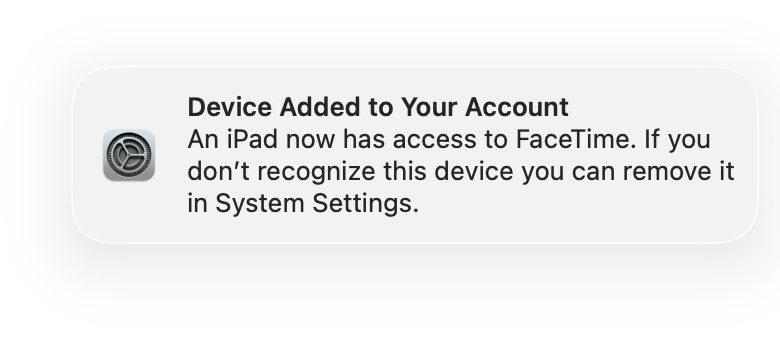

Some iPhone, iPad, and Mac users may have noticed a message that suddenly appears on their device that reads;
“Device Added to Your Account – iPhone/Mac/iPad now has access to FaceTime. If you don’t recognize this device you can remove it in System Settings.”
Getting this notification out of the blue can be a little scary, especially if you haven’t added a new device to your Apple ID, or don’t remember doing so. The purpose of this message is to serve as a security alert to ensure that the logged-in devices belong to you, and are authorized to do so.
Fortunately, this message usually appears in a legitimate situation indicating the use of the device, although it should not be ignored because it may indicate a problem.
Let’s dive into what this “Device has been added to your account” message means and what to do if you see it.
Why you might see the message “Device Added to Your Account”.
Apple will send this notification to your devices whenever a new device signs in to your Apple ID and activates FaceTime, and associates that device with your Apple ID account, phone number, and email address.
Some common situations that may trigger this message include the following; you just got a new Apple device and used your Apple ID to sign in, restore or reset the Apple device and sign in again, someone in your household added another device to your Apple ID, signed in to FaceTime/Messages/iCloud on a device you hadn’t used before, and sometimes even if the device was just turned on after a long time of non-use, or even after a simple software update.
There are many possible reasons why you might see a “Device Added to your Account” message on your iPhone, iPad, or Mac, and because there are security implications here, it’s wise to track this message and check the devices associated with your Apple ID and account.
What to do when you see the device
If you recognize the device mentioned in the alert, or the alert matches your expectations (for example you just got a new iPad setup and you see the alert on your iPhone), you don’t need to do anything. No action is required, as the message simply confirms that your new device is now capable of using FaceTime or Messages.
What to do if you do NOT see the device
But what if the “Device Added to your Account” notification pops up? What if you didn’t just set up a new device, and you didn’t expect to see this message?
If you see this notification and it mentions a device you don’t recognize, your first step is to review the devices associated with it and connected to your Apple ID. You will then want to remove anything suspicious, or out of place.
Check ALL Devices Signed in to your Apple ID
On your iPhone or iPad, you can view all devices associated with your Apple ID by doing the following:
- Go to settings > tap on your Apple ID / name at the top > scroll down to see a list of all devices signed to your Apple ID
- Tap and remove any unknown device by tapping “Remove from Account”
- Change your Apple ID password later
On a Mac, you can view all device associations and remove unknown devices by doing the following:
- Go to Apple menu > System Settings > click on your Apple ID > scroll to see a list of all devices signed to your Apple ID
- Click and remove any unknown device by selecting “Remove from Account”
- Change your Apple ID password after you’re done
I would also recommend finding all devices known to be associated with an Apple ID, to make sure nothing is missing, stolen, lost, borrowed without your knowledge, or used without your permission.
Removing unknown devices is important
If you see a device you don’t recognize or haven’t added yourself, or no authorized person or family member has added, you’ll want to remove it from your account, which will immediately revoke access to your Apple ID and associated services such as FaceTime and iMessage, and iCloud.
You will then want to change your Apple ID password, so that no unauthorized person can use your Apple ID again in the future on any device.
You can change your Apple ID password by going to Settings > Apple ID / your name > Password & security > Change password
All the devices are mine, but I haven’t recently signed in with an Apple ID on any of them, why am I seeing this warning?
The notice aims to help users quickly find unauthorized access to their Apple ID account and related services, but it is not complete. In fact, sometimes you may see this message for no reason, and that is a shocking situation for many users.
I recently encountered this, where I got a “Device Added to Your Account” message sent to all my devices that I use continuously. I had just set up a new iPad about two months ago, so that wasn’t the explanation. One of my devices recently installed an iOS update, and that may be what caused the message on my other Apple devices.
Another possible situation where you may see this message is this; a device you own is borrowed or used by someone else who signs in to your Apple ID. This is a confusing situation because you will see all the names of the device, so nothing looks unusual. But maybe a spouse, sibling, parent, child, relative, friend, partner, or roommate, signed in to one of your devices, with your Apple ID, and now that device can use FaceTime, Messages, iCloud, etc. These situations also happen, which is why it’s important to physically locate all the devices you know are associated with your Apple ID account.
Unfortunately, the alert doesn’t really name the specific device, a vague “iPhone”, or “iPad”, or “Mac”, which isn’t particularly helpful if you have a bunch of Apple devices associated with your account. Apple should improve this message and security notice by providing more information about the added device, including the name, model, and serial number of the added device. This will make the discovery of unauthorized and authorized devices easier, and could be the low-hanging fruit for Apple to improve this messaging and security system.
–
The bottom line is, “Device Added to Your Account” is a security message designed to alert you to new devices added to your Apple ID. If you’ve recently set up, restored, repaired, signed in, or updated an Apple device, that’s probably why you’ll see this message. But don’t ignore it, because it’s possible that an unauthorized person can log into your Apple devices with your Apple ID, or use your Apple ID without your knowledge. So it’s best to check your list of devices associated with Apple ID, remove any unknown devices, and change your Apple ID password if you see something wrong.
Have you ever seen the “Device Added to Your Account” message out of the blue before? What situation caused you? Share your experiences and thoughts in the comments.