What is the best Laptop Replacement?
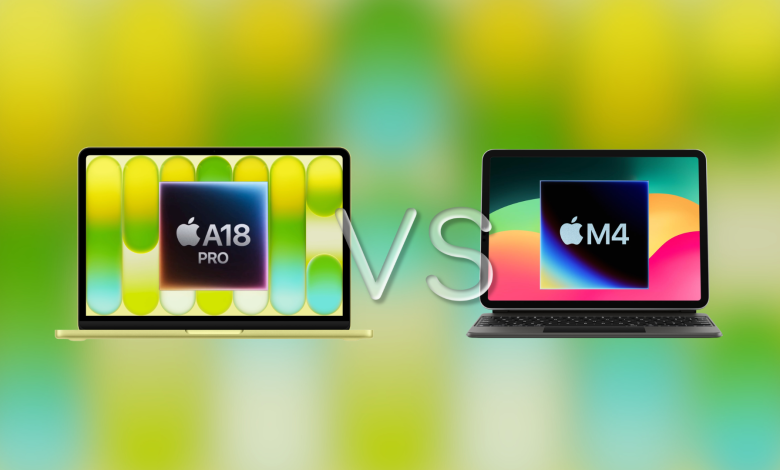
Apple’s new $599 MacBook Neo and $599 iPad Air (M4) sit at the same entry price, but they change the laptop in very different ways, because one uses macOS with a built-in keyboard and trackpad, while the other uses iPadOS with a touchscreen interface that only becomes “laptop-like” after adding a keyboard case.
If you want the short version, the MacBook Neo wins as a direct laptop replacement at $599, while the iPad Air (M4) wins in performance headroom and tablet flexibility, but only if you accept the additional cost of Apple’s Magic Keyboard, which pushes the bundle closer to $900.
MacBook Neo vs iPad Air M4 as a laptop replacement
| Specifications / Costs | MacBook Neo (base) | Base for iPad Air 11-inch (M4). | iPad Air (M4) + Magic Keyboard | iPad (A16) + Magic Keyboard Folio |
|---|---|---|---|---|
| The original price | $599 | $599 | $868 ($599 + $269) | $598 ($349 + $249) |
| The chip | The A18 Pro | M4 | M4 | A16 |
| RAM | 8GB | 12GB | 12GB | Apple doesn’t write it on the spec sheet, but the USB and display limitations are pretty straightforward |
| Storage (base) | 256GB | 128GB | 128GB | 128GB |
| OS | macOS | iPadOS | iPadOS | iPadOS |
| Ports | 2× USB-C (1× USB 3 up to 10Gb/s + DisplayPort, 1× USB 2 up to 480Mb/s) + 3.5mm | 1× USB-C (USB 3 up to 10Gb/s + DisplayPort) | Likewise, and the charging of passing through the keyboard | 1× USB-C (USB 2 up to 480Mb/s + DisplayPort) |
| External display | DisplayPort over USB-C (Apple lists it for use without a display; specifications vary by display) | 1 external display up to 6K at 60Hz | Up to 6K at 60Hz | 1 external display up to 4K at 60Hz |
| Claim of battery | Video streaming of up to 16 hours | Apple and retailers usually list about 10 hours for iPad Air class devices | Likewise | Expected “all-day” iPad usage (varies by workload) |
What actually determines the “best replacement laptop”
1) Compatibility with the application and workflow
If your “laptop replacement” means desktop-grade applications, full browser behavior, and platform edge casesmacOS still gives you a more predictable experience day in and day out. That is important for workloads such as:
- financial and accounting workflows that rely on Excel desktop behavior
- specialized company applications or legacy web tools behave better in desktop browsers
- multitasking across multiple windows, files, and external peripherals
That’s why most students and professionals still default to a laptop even if the iPad hardware feels fast enough.
2) Quality keyboard and trackpad for the price you want to pay
In $599The MacBook Neo already includes what most people call a “laptop”: a solid keyboard, a trackpad, and a clamshell design that fits in your lap.
With the iPad Air, you can totally get a laptop-like setup, but if you want Apple’s trackpad experience, you usually end up buying a Magic Keyboard, and Apple charges the prices 11-inch iPad Air Magic Keyboard for $269pushing the pile to $868.
If you’re looking for a “keyboard + trackpad included” concept under $600, the pure Apple option is it $349 iPad (A16) as well as $249 Magic Keyboard Foliototal $598but accept weak performance and slow USB transfer speeds.
3) Multitasking improvements in iPadOS 26 help, but don’t erase the gap
iPadOS 26 introduced more flexible windows system where you can resize and move app windows more freely, helping the iPad feel closer to a laptop when using a keyboard and trackpad.
That said, a better window manager doesn’t automatically optimize application feature slotsespecially for “work” apps where iPad versions still behave differently than desktop versions, so your specific apps still determine the outcome more than OS marketing.
Which one should you choose?
Choose the MacBook Neo if you’re looking for an affordable laptop replacement for $599. It makes sense if you care more about:
- macOS software compatibility and a few workflow surprises
- built-in keyboard and trackpad with no hardware
- Long battery life with video streaming compared to normal iPad usage claims
Choose the iPad Air (M4) if you’re looking for a device that’s more flexible, and pays well for “real computing money” once you add a keyboard. It makes sense if you care more about:
- using it as part of a tablet’s day, with support for the Pencil and cameras suitable for quick scanning and capturing
- Strong performance headroom from the M4-class platform
- external display support up to 6K at 60Hz
Choose the iPad (A16) + Magic Keyboard Folio if you want the flexibility of an iPad with a trackpad under $600. It makes sense if:
- the budget is stuck hard under $600 and you still want a trackpad
- you can live with USB 2 transfer speeds and poor overall performance
Final Decision
For many people who ask “best laptop replacement,” the answer is always boring: MacBook Neo it replaces a laptop very cleanly at $599 because the full package already behaves like a laptop, while iPad Air (M4) it only becomes a better “do-it-all” device after you accept the hardware costs and ensure that your must-have apps work the way you need them to on iPadOS.