Apple Studio Display XDR Review: Too Much But Not Enough
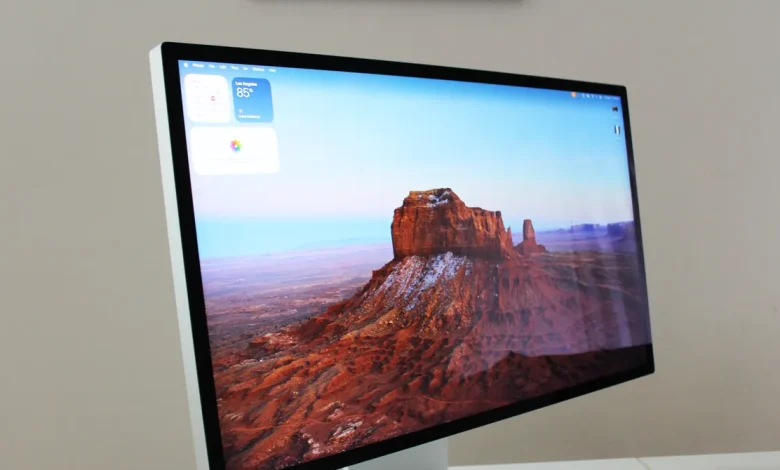
Suppressing the darkest areas is part of the equation for good HDR. You also need as much brightness and contrast as you can squeeze out, and the Studio Display XDR delivers at an unprecedented level.
Apple says this can go up to 2000 nits of maximum brightness, and when I measured it myself with my colorimeter, it came out to 1905 nits in a 25 percent window. That is really impressive. Meanwhile, it can even do 1701 nits at 49 percent and 948 nits at full screen. This is the brightest computer monitor I have ever reviewed. Although contrast and color performance can’t be compared to OLED, creators working in HDR will get more out of the Studio Display XDR. For example, I tested the Dell 32 Plus QD-OLED, which does HDR well, but only outputs 946 nits. And that’s only in the 1 percent window.
Most of your use of Studio Display XDR will be in SDR, not HDR. Here, there are a few trade-offs. First, I measured maximum brightness at 463 nits, although the display can reach 1000 nits in bright rooms using the ambient light sensor. You can’t just force it to 1000 nits though. According to my SpyderPro colorimeter, I measured a Delta-E color error of 0.76, which is quite accurate. I will say, the performance in the AdobeRGB color space turned out to be only 88 percent, which is behind what you get from OLED monitors.
Some Warnings
There are some limitations associated with Studio Display XDR. No Intel Macs are supported at all, which shouldn’t be a problem for most people, as long as you haven’t bought a Mac Pro recently. The desktop computer was the last Intel-powered Mac in the lineup and was only discontinued in 2023. Alternatively, there are Macs that can support a 120-Hz refresh rate. For example, the M1 Pro, Max and Ultra chips only support 60 Hz on Studio Display XDR. That means even if you bought an M1 Ultra Mac Studio, you’re locked to 60 Hz. That’s bad.
This is a small thing, but one of the USB-C ports on the back is for power delivery to charge your laptop with a single cable. This is common these days for monitors, but the input can only deliver 96 watts of power. The 16-inch MacBook Pro comes with 140 watts of power. If you’re doing heavy duty on something like the M5 Max, you need all that power, but this means charging less. There were reports that in the 14-inch MacBook Pro with M5 Max, it could not hold a charge with its 96-watt power during heavy loads such as gaming.
Then there is the price. Like the Vision Pro, Apple feels confident charging a lot for this niche use case monitor. However, monitors with true HDR aren’t as new as they were in 2019. At the time, most monitors were marketing HDR without proper lighting to back it up. But a lot has changed in seven years and the market is now flooded with affordable OLED and Mini-LED monitors that can do HDR, mainly due to the popularity of OLED in PC gaming.
What’s different about the Studio Display XDR, then, is how strong the HDR effect is. Don’t get me wrong: The overall package is very powerful and the HDR performance is truly top notch for those who want it. But like the Vision Pro, it won’t be the disruptive force it claims to be, and most of us will go back to wishing Apple would make a 32-inch monitor, or perhaps something more affordable to pair with a Mac mini or MacBook Air. So far, Studio Display or Studio Display XDR has no bill.