watchOS 26.4 fixes a major complaint of the Apple Watch Workout app
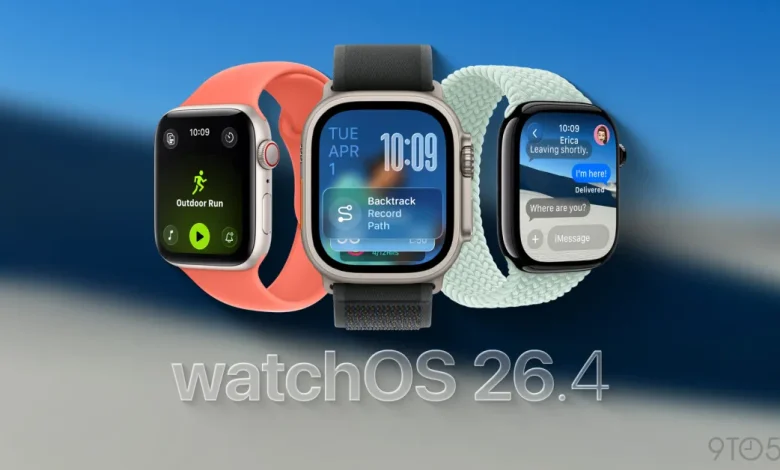
Apple redesigned the Workout app in watchOS 26, but not everyone liked the new Apple Watch activity tracking experience. It turns out that Apple was listening, because watchOS 26.4 addresses the biggest complaint about the new design.
watchOS 26.4 improves the user experience of the Workout app
A common complaint about the Workout app in watchOS 26 is that it feels slow or requires more interaction to start a workout.
The redesign is a big change after a decade of using the Apple Watch Workout app in one form or another, of course. The current design is also a bit simpler.
The problem is that what worked as a tap button in the previous design was now a decoration that would ignore your tap.
With watchOS 26.4, however, Apple is tweaking the existing design of the Workout app to work the way users expect.
With the release notes: The workout type icon in the workout app lets you start a workout with a single tap.
Boom, that’s what people need. Now the workout icon/label again the play button does the same thing: start tracking your workout.
Tapping the icon from the list view still requires viewing the entire workout to load into it. If you’re quick enough and tap the workout icon while the list is still visible, your tap is still ignored.
That’s another area where this could be improved, but the watchOS 26.4 change is a nice improvement in the user experience from watchOS 26.0 to the behavior of watchOS 26.3.
What went wrong and how Apple fixed it
Before watchOS 26.4, the Workout app introduced a moving list of workout type icons and labels.
Naturally, you would expect to be able to tap the workout icon in the list to start. Instead, the full workout structure needed to be loaded into it, and tapping the workout type icon did nothing.
The design seems to be optimized to avoid accidentally starting a workout. It may also lead you to pause and look at the new design while encouraging you to tap the four corner buttons before starting your workout. This is for adjusting Workout View, Goals and Targets, Media, and Workout Buddy and Alerts.
It wasn’t optimized for speed or previously developed muscle memory.
Instead, the “Play” icon was the only way to start the workout. This is already mixing metaphors in a confusing way … since you are recording a workout and not playing a session.
However, watchOS 26.4 fixes this messy situation with the simple change mentioned above.
For me, I had adapted to the new behavior after using watchOS 26.0 with watchOS 26.3 since June. Still, I’m glad Apple is listening to the feedback and improving the user experience. The new design still lingers in the back of my mind. Something about the middle and bottom icon placement made me want to scroll up, especially since the middle icon did nothing.
However, the goal should be to have a good experience for the first run, not to adapt to an intuitive system after enough repetitions. Nice to see this fix in watchOS 26.4.
Apple Watch update availability
watchOS 26.4 is available in beta as a release candidate today. The final version will probably be available next week.
Buy the new Apple Watch Series 11 starting at $299 to start tracking your activity and reaching your fitness goals.


FTC: We use auto affiliate links to earn income. More.