macOS Tahoe 26.3 Update Released

Apple has released macOS Tahoe 26.3 for all Mac users to install as a software update. macOS Tahoe 26.3 focuses on bug fixes and security enhancements, and is recommended for all Tahoe users.
Mac users running Sequoia or Sonoma will receive minor updates targeting the security patches available for those versions of the system software instead.
Separately, Apple also released iOS 26.3 update for iPhone, iPadOS 26.3 update for iPad, and watchOS 26.3, tvOS 26.3, visionOS 26.3, and updates for older iPhone and iPad models.
How to download and install MacOS Tahoe 26.3 Update for Mac
Make sure to back up your Mac with Time Machine before starting the software update.
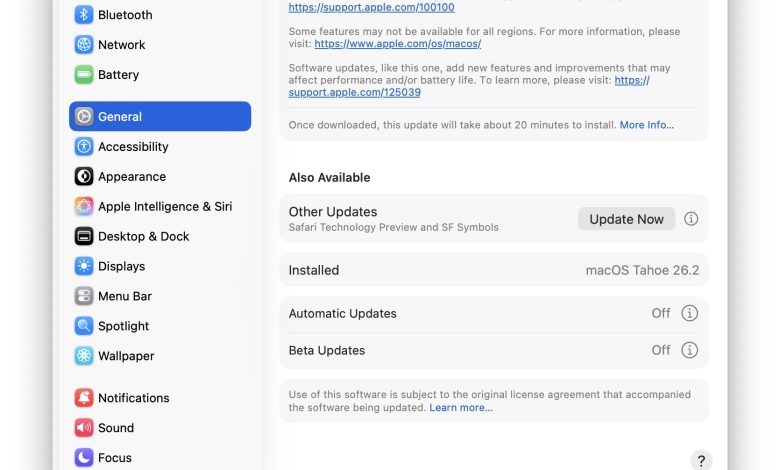
- From the Apple menu on a Mac, go to “System Preferences”
- Go to “General”, then “Software Update”
- Select to “Update Now” to start downloading and installing macOS Tahoe 26.3 update on Mac

MacOS Tahoe 26.3 is a huge 13+ GB download, and installation can take a while so be patient. Your Mac must restart to complete the installation.
If you’re running macOS Sequoia or macOS Sonoma, you’ll also find updates to install for those versions of macOS instead.
Optionally, you can download the IPSW or installer packages for each of these system software versions below.
macOS Tahoe 26.3 Direct Download Links
The following links point to the macOS Tahoe 26.3 installer package file and the macOS Tahoe 26.3 IPSM firmware file on the Apple CDN servers:
MacOS Sequoia 15.7.4 & MacOS Sonoma 14.8.4 Installer Download Links
macOS Tahoe 26.3 Release Notes
The release notes accompanying the macOS Tahoe 26.3 download are very brief without being specific:
macOS Tahoe 26.3
This update provides important bug fixes and security updates.
For information on the security content of Apple software updates, please visit:
Some features may not be available in all regions. For more information, please visit:
Software updates, like this one, add new features and improvements that may affect performance and/or battery life. To learn more, please visit:
The only bug fix that should be fixed as mentioned on the Apple developer site is to solve the problem where it is difficult to resize windows when trying to hold where the user would expect to hold the window to change the size. There is no mention of a solution to any other bugs or problems with Liquid Glass, Reduce Brightness is completely disabled, a popular Accessibility feature that can help annoying compatibility issues with MacOS Tahoe. We will update this article with any important changes or fixes to Liquid Glass, if available.
Don’t forget to update all your other Apple devices, including other Macs, iPhones, iPads, Apple Watch, Apple TV, Vision Pro, and anything else you have, because there’s an update available for almost everything today.