How to get Spotify Premium on iPhone or iPad
In this short post, we’ll tell you why you can’t subscribe to Spotify Premium within the official iOS app using Apple billing and how you can finally get premium music on your iPhone or iPad.
Why you can’t sign up for Spotify Premium on its iPhone app
Apple takes a discount from app developers for all app and subscription sales, In-App Purchases, and sales of digital goods and services (like movies, not physical products like Amazon) made within an iOS app using the Apple App Store payment method.
Because of this, the app developer may have to share up to 30% of the sales price with Apple as a commission. After the first year (ie, from the second year onwards), Apple charges a 15% fee on subscription renewals.
Now, there is an App Store Small Business Program where Apple takes a reduced 15% commission, but this is only for new businesses that make up to 1 million USD in annual sales. Given Spotify’s size, it hardly qualifies as a small business.
Second, Spotify has to pay record labels, music publishers, and artists for the songs people stream on its platform. These license fees make up a large part of its revenue expenditure.
Unlike Apple Music (owned by Apple) or Amazon Music (owned by Amazon), Spotify operates as an independent music streaming company. It does not have a large, profitable hardware or e-commerce business to support it.
In short, Spotify already operates on thin margins, and paying App Store commissions will reduce Spotify’s margins.
To avoid this, already popular app developers, such as Spotify and Netflix, do not offer the option to purchase a premium subscription plan right in their official mobile apps. This way, they don’t have to pay any commission to Apple. Spotify stopped allowing new users to sign up for a premium subscription through the Apple App Store around 2016.
Here’s more about it:
About the price and external development links in the Spotify app on iOS
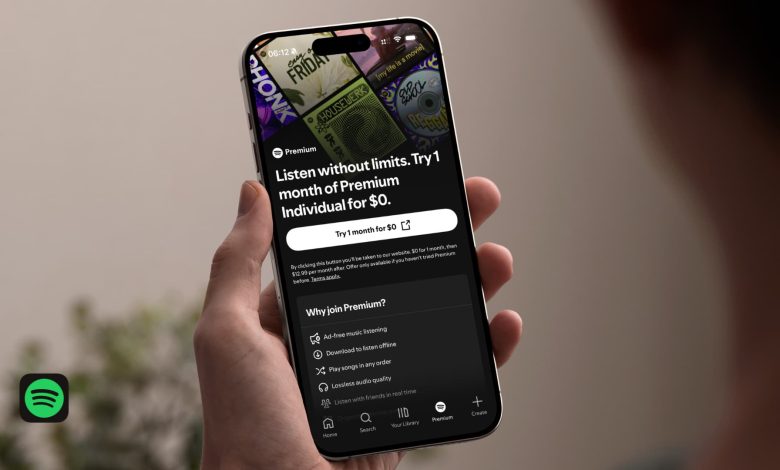
Digital marketing law (DMA) in the European Union and recent court decisions (such as the Epic Games case) in the United States are relaxing the rules and allowing app developers to display pricing information and include links to their websites for purchases. Spotify has done this for users in the United States, as seen in the screenshots below.

However, in some markets, Spotify still has to follow the old Apple App Store rules that prevent it from displaying a price or providing a clear link to direct customers to its website to make a subscription payment.

Sign up for Spotify Premium on iPhone and iPad
1) Open the Spotify app, go to Premium tab, and check out the benefits.
2) When you’re ready to buy, tap the trial or find buttons when they appear (for US and EU users). If you’re from another region, visit spotify.com/premium in Safari or Chrome on your iPhone, iPad, or computer. If you see prices in a foreign currency, scroll to the bottom of the website, tap the current region name, and select yours.
3) Scroll down to see all premium slabs: Each person, Student, Duo (for two accounts), The family (6 accounts), or another region-specific program (such as a Lite system in Asian countries). Choose the plan you want, tap the buy button, and sign in using the same account you use on the iOS Spotify app.

4) Now, enter your address (used to calculate tax), choose a payment method (which varies by region), read a summary of your registration, and complete the purchase.
5) Once the payment and registration is successful, force close and reopen the Spotify app on your iPhone, and you will see the premium benefits here. You can sign in with this account on more than one device on any platform.
Cancel Spotify Premium on iPhone or iPad
Since you haven’t (and can’t) subscribe to Spotify using the Apple App Store payment, you won’t find it under the Subscriptions field in iOS Settings > Apple Account.
If you want to cancel your Spotify subscription, go to spotify.com in a web browser and complete the cancellation process.
More on Spotify: