I used this SSD flash drive to solve my Pixel 10 Pro XL storage problems
I have the 256GB version of the Pixel 10 Pro XL, and it didn’t take long to fill up the storage on the phone — I managed to do so in just under three months. As much as I like the Pixel 10 Pro XL, it annoys me that Google isn’t selling the 512GB or 1TB models in all countries; in India, Google is selling only the 256GB model of the device.
That’s why I turned to TeamGroup X2 Max. I’ve used a number of external SSDs over the years, and while I always have LaCie’s Rugged SSD4 on my desk, the X2 Max is my go-to choice whenever I need to move photos and videos to the phone. The reason I use the X2 Max is straightforward: it’s much smaller than most other SSDs I own, and it’s flexible like no other drive.
I got the 1TB version of the X2 Max, and it costs $124 on Amazon. There’s also a 2TB model if you need more storage, and that variant is available for $189. The best thing about this drive is that you get a standard five-year warranty.
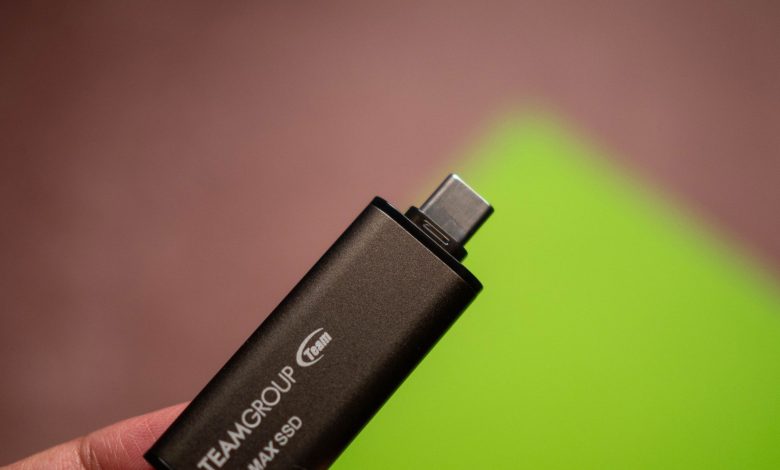
The X2 Max looks like a regular flash drive, but don’t be fooled by the design – it houses a custom NVMe SSD, and the model I’m using has 1TB of storage. That’s more than enough to carry the storage I need for occasional downloads, and the size of the drive is the reason I take it with me when I travel.

Oh, and it has USB-C and USB-A ports, making it easy to use with any device. I don’t like the removable cables that come with most external SSDs as I tend to lose the good ones all the time, so the fact that the X2 Max has built-in USB-C and USB-A connections makes things easier for my use case.
It has proven to be durable in the six months I have used it; I took a drive in seven countries, and used more than a dozen Android phones, including the Pixel 10 Pro XL, Find X9 Pro, Vivo X300 Pro, Galaxy Z Fold 7, and Pixel 10 Pro Fold. I didn’t see any issues then, and it’s an easy way to transfer photos and videos to and from the iPhone 17 Pro.

What I love most about the X2 Max is how easy it is to use; I simply plug the drive into the phone so I can access the internal storage. And because it’s an SSD, you get a fast transfer of 1,000MB/s, so you don’t have to wait long to move a large chunk of data to the device.
I will admit that the drive gets warm during extended transfers, but that’s the case with most SSDs. The drive uses the USB 3.2 Gen2 x1 protocol, and because of the way the SSD cache works, you don’t always get 1,000MB/s writes when transferring a lot of data, and it drops to 340MB/s. Still, that’s a lot faster than a regular flash drive, and 1TB of storage means you can easily store several thousand videos and hundreds of thousands of photos on the drive.

I used the predecessor of the X2 Max – the X1 Max – for almost two years before switching to the new drive, and in addition to the same design, the drive itself is fast and reliable. It is this reliability that makes an external drive an option when traveling. The drive is made of aluminum alloy, and weighs only 12g. Both USB-C and USB-C ports get caps that provide a measure of protection as well.
Overall, the X2 Max proved to be the perfect drive for using my Pixel 10 Pro XL. Not having to worry about my phone running out of storage is always a good thing, and I just transfer data to an external SSD whenever I get close to filling up the 256GB internal storage.

The X2 Max is the perfect external SSD if you want to free up storage on your phone. It has built-in USB-C and USB-A connections, and its small size means you can take it anywhere. Best of all, it keeps the SSD as fast as other external SSDs.