Optoma Photon Life PK32 review: Basic features but impressive 4K photos
To help us provide you with free, unbiased advice, we may earn a commission if you shop through links on our site. Read more
On this page
-
Sharp images and vibrant color
-
Perfect for PC and console games
-
Good value for money
-
A faint sound
-
Lack of HDR
-
Small features
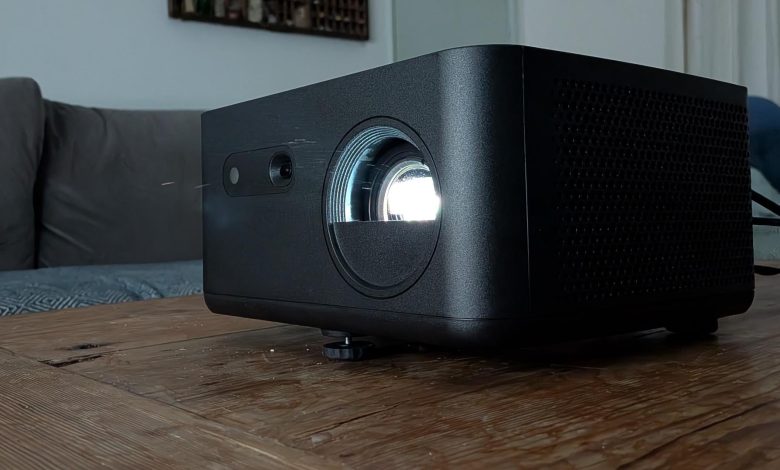
Like other big names in home cinema gear, Optoma is transitioning from traditional lamp-based projectors to compact models based on LED or laser technology. The new Optoma Photon Life PK32 is smaller, lighter and quieter than popular models like the Optoma UHD38. It’s easy to set up, and its light source will last up to 30,000 hours.
However, what I enjoyed about this projector was the way it kept things simple. It’s not a very stylish projector. It doesn’t have many lifestyle features. It’s not even designed to be a one-stop home cinema experience. It’s simply a great 4K projector that offers reliable image quality at a surprisingly affordable price.
What do you get for the money?
For £699, you get a 4K projector that uses a 4 x LED light source to illuminate images between 60in and 150in with a maximum brightness of 1,100 lumens. It uses a DLP chip with a native resolution of 1920 x 1080, then uses pixel shifting to simulate 4K. Optoma’s new Time-of-Flight technology gives you auto-focus and auto-keystone correction in seconds, while a dedicated game mode makes this a great option for PC or console gamers. The PK32 supports basic HDR and HLG formats, but not HDR10+ or Dolby Vision.
Like the BenQ GP520, the switch from a conventional lamp to an LED makes for a very small unit: the PK32 measures just 238 x 215 x 130mm (WDH). There’s nothing fancy about the black plastic shell or the overall design, but it’s functional and unobtrusive. The front foot comes out with screws to give you tilt, and there’s a socket at the bottom for a tripod or ceiling mount.
The optical system includes a zoom and variable lens shift, giving you more flexibility in your position and a throw ratio of 1.12 to 1.46:1. You can have a 60in image at 1.69m, or a 100in image at 2.47m, so it should work for medium to large living rooms. In theory, you could go as big as 150in at 3.7m, but I suspect you’ll lose some brightness and contrast at that range. The sweet spot is about 80in to 120in.
In some ways, what you don’t get for money is just as important as what you get. There are built-in speakers, but they are only 5W, and Optoma makes no claims about focused surround sound. There’s also no onboard streaming, just two USB ports for your consoles, Blu-ray players or streaming sticks. One supports eARC, and you also get a USB-A port to power a streaming stick, a USB-C port and a 3.5mm audio output.
What does it do well?
First, this is a really easy projector to work with. The upside of not having streaming services is that you can just plug in your sources, select a source and let auto-key and auto-focus do their thing. The on-screen menus are straightforward to follow, and while the compact remote could do with more separation in the key layout, it’s quick and easy to make changes or switch between options. There are eight picture modes – Vivid, HDR, HLG, Cinema, Game, Reference, Bright and 3D – and they’re all self-explanatory. You are locked into HDR and HLG modes when viewing HDR or HLG content. But there are more detailed controls for color and geometry if you need them.
Second, the image quality is decent, especially given the relatively limited light levels. You don’t get the sharpest definition or vibrant colors that I recently saw in the Hisense C2 Pro (£1,499) or the XGIMI Horizon S Pro (£1,189), but both projectors are very bright and expensive. Watching Star Wars: Andor, John Wick 3: Parabellum again The Northmanthe PK32 gave me clarity and 4K images with a real sense of depth.
Colors look natural without appearing muted, and I found that the HDR and Cinema modes gave me the kind of fuzzy, cinematic presentation that I struggle to find on more expensive projectors without a lot of tweaking. Movement is fluid but artificially smooth, and there is plenty of texture and detail. Even HD content, including the real Arnold Schwarzenegger Running Manhe looked beautiful.
I couldn’t beat the Optoma’s 95% coverage of the DCI-P3, but 82.3% in clear mode is pretty good for a gaming machine at this price point, and it covers 96.5% of sRGB with a volume gamut of 126.7%. Blacks aren’t perfect, but they’re not too gray or muddy either, and color accuracy is surprisingly good, with a Delta E rating of just 2.09 in our tests in reference mode.
Above all, this is a great gaming projector, much like the old Optoma UHD38. It’s nowhere near as bright – the UHD38’s lamp can reach 4,000 lumens – but it’s bright enough for night gaming, and during sessions Doom: The Dark Ages again Sonic Racing Crossworlds, I didn’t see any bad smearing artifacts or obtrusive lag. In game mode, the colors look really impressive, and the image seems to be adjusted to capture shadow details. I recorded a low lag of 4.6ms, and you can even play the game at 1080p/120Hz on consoles or PCs that support it, which I found perfect A disasterIntense and ultraviolet demon slaying battles.
What can I do better?
The lack of Dolby Vision and HDR10+ is not a problem because the PK32 strives to do any HDR well. Highlights have a bit more zing than HDR content, but I saw neons of John Wick 3, and incoming bursts of A disaster take a closer look. If you want more convincing HDR, you really need to pay something for a higher brightness ceiling.
The sound is also disappointing. I knew the speakers weren’t very powerful, but I was still amazed at how small and lightweight the output is, especially when playing games or watching big movies. Even on small-scale TV shows, the dialogue seems garbled. There is no Bluetooth, so I would recommend connecting a sound bar or – to watch it late at night – just plug in some headphones.
While this isn’t a loud projector, it still puts out about 30 to 32dBA in daily use, which is a little annoying during quiet times. You won’t notice as much if you’re using external speakers, but it’s a problem if you’re relying on internal sound.
Should you buy the Optoma Photon Life PK32?
Poor sound and a lack of built-in streaming may put you off if you’re looking for a one-box home cinema system, but I think the Photon Life PK32 has a lot to offer anyone new to a big-screen projector. It’s a great partner for consoles or 4K Blu-ray players, and can always be expanded with a streaming stick. It works like a charm with a Roku Streaming Stick 4K powered by a USB slot.
In terms of image quality, it outperforms the Philips GamePix 900 and Anker Nebula Cosmos 4KSE, and you’ll definitely need to stretch to the BenQ GP520 for a sharper, sharper image. So while it may be a basic, no-frills option, the PK32 gets a big win for the money.