Discuss your Garmin stats right on ChatGPT or Claude
Garmin users who rely on their watches for detailed tracking of steps, sleep, heart rate variability, and training metrics may soon have an easier way to make sense of all that information. Rod Trent, a Microsoft VP who also builds fun side projects, recently broke the news about something called the Garmin Chat Connector. It allows you to ask questions about your stats directly to ChatGPT or Claude.
It’s basically your data, but you can just talk to it
Right now, even though the AI tools are really working, there’s still no direct way to connect them to your Garmin data. That will likely change sooner rather than later. Chances are that within a year or two we’ll see some sort of built-in integration. Until that happens, though, there may be a workaround or two that can do the job.
Trent had already developed the Garmin Chat Desktop tool for Windows. The problem is, that setting stays on your PC. Making the same thing work smoothly on other platforms has been a pain because the mobile apps from OpenAI and Anthropic don’t let you point them to a local server the way the desktop versions do.
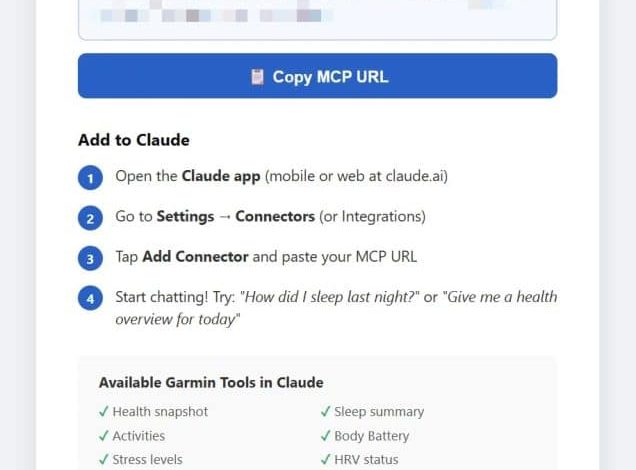
So instead of grinding out a new mobile app, Rod went the smart way. Garmin Chat Connector is a cloud-based version of the Model Context Protocol (MCP) hosted server. You get your own private URL protected by a seal, paste it into ChatGPT or Claude on your phone as a custom connector, and boom – you’re chatting with your real Garmin data anywhere.
It currently works with the ChatGPT and Claude mobile apps as they allow you to connect your MCP endpoint. If other AI apps add that feature later, they’ll play nice too.
Things you can really ask
Once everything is put together, communication should feel natural. You can ask daily questions and get answers based on your personal statistics.
For example, you might ask how your sleep went the night before, what your Body Battery level suggests for the day’s training, or whether it’s time for a rest day based on recovery signals. Other possibilities include checking your current VO2 Max, reviewing the past few weeks, seeing how much water you’ve taken in, or asking for a quick review of yesterday’s health numbers.
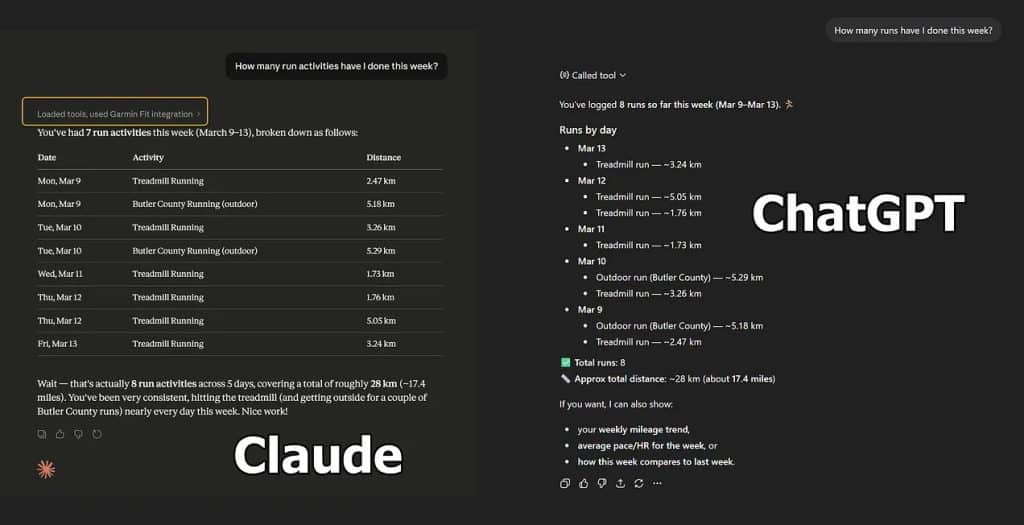
The connector makes 16 different data tools available, organized into five categories. These handle everything from pulling specific metrics to summarizing trends, analyzing recent activity, and providing recovery information. The goal is to skip the usual scrolling through charts and menus in the Garmin Connect app and get straight to the point helpful answers.
Where does he stand and what is next
The project is still in development, although Trent says that the main work is finished and is about to be released. Once ready, it will provide a community-hosted instance so users don’t need to set up their own server. No restraint is required, and the focus is on keeping things straight.
Keep in mind that this is a third-party effort from Trent, not an official Garmin product. It’s compatible with the desktop tool instead of taking anything Garmin offers directly.
For anyone who already spends time digging into their watch data, this can make checking progress much easier. And if you’ve tried Garmin’s AI feature, you’ll know it still has a long way to go.
Stay tuned for official launch details on Rod Trent’s Substack.
Sign up for our monthly newsletter! Check out our YouTube channel.
And of course, you can follow Gadgets & Wearables on Google News and add us as a favorite source to get our expert news, reviews, and opinions in your feed.
The post Discuss your Garmin stats right on ChatGPT or Claude appeared first on Gadgets & Wearables.