Vivaldi browser gets a customized immersion mode that I wish Safari or Chrome offered
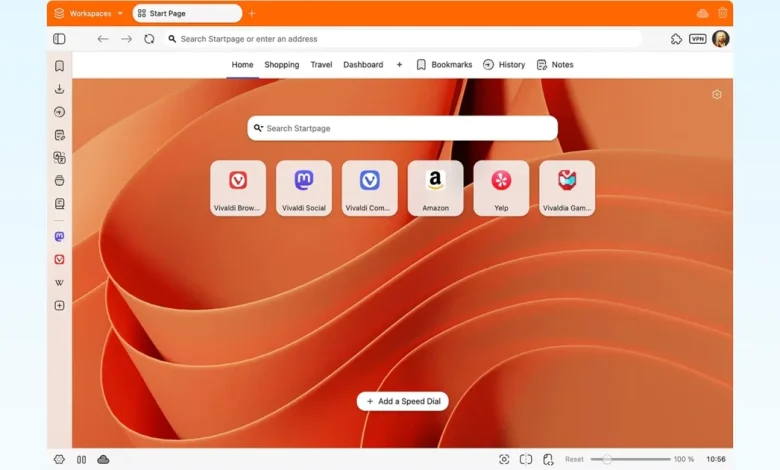
Vivaldi takes a new look at how your browser should feel if you want fewer distractions. With its latest update, version 7.9, the browser introduces a customizable immersion mode that gives you more control than commonly used browsers like Safari or Chrome.
Vivaldi offers new features for seamless browsing
The browser’s new UI Auto-hide feature allows the entire interface to disappear while browsing, and instantly return when you move your cursor to the edge of the screen.
The best part is that Vivaldi lets you decide what disappears. Only the tab bar, only the address bar, or everything including panels and toolbars. You can turn it on via a shortcut or from settings, and it adapts to how you use the browser instead of locking you into one mode.

You can also toggle UI Auto-hide with the keyboard shortcut Cmd F10 or Ctrl F11, or with an icon in the Status Bar. All options are available under Settings > Appearance > Auto-hide UI.
Vivaldi pairs the immersion mode with a feature called Tab Tracking. When you open a link using this option, it loads alongside your current page instead of replacing it.

Any new links you click continue to open in the side panel, while your original page stays right where you left off. It also adds flexibility with keyboard shortcuts and mouse gestures, so you can trigger this action without breaking your flow.
The update also improves split view, or tab tiling, which makes it easier to organize multiple pages side by side. You can manage layouts more smoothly and adjust how tabs share space, which helps when working or comparing information across sites.

There is also an update for Vivaldi Mail. Composer can now open in a separate window, so you can compose emails alongside your inbox or on another screen.

You can switch between rich text and plain text with a single conversion, and performance has been improved for large inboxes. Vivaldi 7.9 is now available for Windows, Mac, and Linux.
How does Vivaldi stack up in Chrome and Safari?

If you use Chrome or Safari, you already know that full-screen mode is basic. Both browsers generally hide interface elements with limited flexibility, and you can’t customize what stays visible. Vivaldi’s approach is unique because it treats immersion as something you can mold around your workflow.
The same goes for multitasking. Chrome and Safari support multiple tabs, but don’t offer a built-in, flexible tile like Vivaldi. You usually need extensions or manual window management to get close to this experience. Vivaldi also offers a built-in VPN through its partnership with Proton, adding an extra layer of privacy without requiring a separate app.
Vivaldi’s latest update builds further on its long-standing focus on customization. The browser is positioned as a tool that adapts to your needs, not the other way around. If you’ve ever wished your browser would just get out of your way, this update comes surprisingly close.