How to access portrait camera mode in iOS 26 on iPhone

The camera app has received a stunning redesign with iOS 26, and many iPhone users have found the new interface confusing, leading them to believe that some prominent iPhone Camera features have been removed. For example, many iPhone users using iOS 26 now think that the Portrait Mode camera has been removed or is no longer available on the iPhone, because when they open the camera application on the iPhone, all they see is “Photo” and “Video” to switch between, and it does not seem that there are other camera modes available.
The logic goes like this; Portrait mode is missing from the obvious camera options in iOS 26, so the Portrait camera feature must have been removed from the iPhone, right? Well, that’s not fair!
The confusion over the apparently missing Portrait camera mode in iOS 26 is understandable, and this is directly related to the dramatic user interface changes that came with the iPhone’s Camera app in iOS 26. But once you learn how access to the camera mode works in iOS 26, you’ll figure it out. you can still access and use Portrait camera mode on iPhone with iOS 26and other camera modes that many users think don’t exist, including slow motion, cinematic, time-lapse, and more.
To be clear, Portrait Mode as a camera option still exists in iOS 26 on the iPhone, it’s very difficult to find, and that’s what we’re going to show you how to use and access here.
How to Get a Portrait Camera on iPhone with iOS 26 (including iPhone 17, iPhone 17 Pro, iPhone 16, etc.)
If you can’t find Portrait camera mode in iOS 26, you’re not alone. Here’s what you need to do now:
- Open the Camera app as usual, initially you will only see the photo and video options available under the shutter button
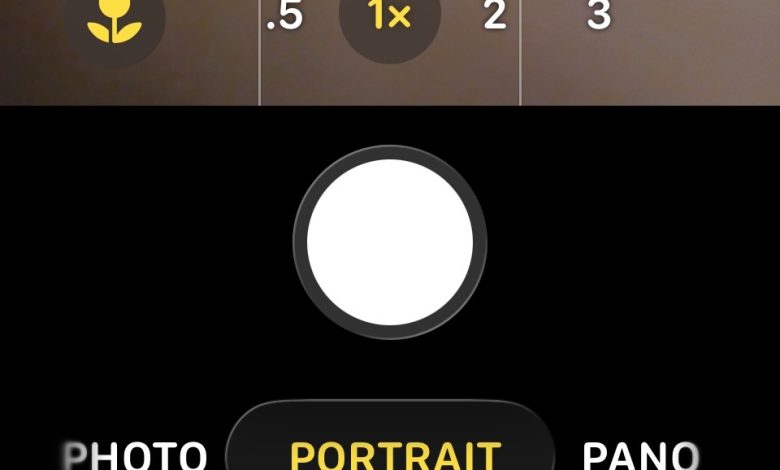
- Now swipe left or right on the camera mode selector “Photo” or “Video” – no indication this is a horizontal swipe menu of options but it is. Keep swiping left or right until you find the “Portrait” camera mode option.
- When you’re in Portrait Camera mode, tap the multi-box button in the top corner, or swipe up to access additional settings, including flash, aperture, timer, exposure, filter, and intensity.


Now you have access to Portrait camera mode again in iOS 26.
Is portrait mode removed in iOS 26 on iPhone? Is Portrait mode not available on newer iPhone models like the iPhone 17 Pro?
Many users think that the standby mode has been removed from iOS 26 on the iPhone.
Additionally, a fair number of people believe that the Portrait mode camera has been removed from the new iPhone models, such as the iPhone 17 and iPhone 17 Pro series.
Neither of these, the Portrait mode camera is still present on all iPhone models running iOS 26, including the new iPhone 17 series, but access to Portrait Mode has changed. Portrait mode is now hidden behind an obscure horizontal swipe menu, something that’s easy to miss or overlook.
Why is Portrait mode hidden in iOS 26 for iPhone?
Given the attention that the Portrait Mode camera features have received in the past from Apple, often as an important feature of taking pictures in the iPhone camera, it is a little puzzling why they hide the Portrait mode and make other camera modes difficult to find.
What Apple has done to make the various cameras difficult to find and hidden is interesting and many users find it confusing or bad design for the user and user experience, but many other decisions of the design of Liquid Glass are questionable and for users who find Liquid Glass difficult to read and interact with. And while Liquid Glass is great on the iPhone and iPad, minus perhaps subtle features like Portrait mode, it’s still terrible on the Mac.
It is important to remember that Apple strongly relies on the practice of obfuscating the user interface, and things that were once obvious and easy to find such as obvious features, buttons, settings, toggles, and touches, are often hidden or hidden, or less than obvious. This is all part of the specific goal of designing a minimal, form-based user interface. These design decisions are often made crudely at first, then changed or reversed, as Apple receives feedback from users and customers about the design. Therefore, it is reasonable to expect that perhaps iOS 27 will make the iPhone camera methods more clear to access again, so there is less confusion among iPhone users.
To quote Steve Jobs, “design is how it works”, meaning that design should be easy to understand and use, and that concept used to be the guiding principle in almost all Apple design decisions. If the user can’t figure out how something works… that’s not good design… but what do I know? I’m a ten-year Apple user who constantly sees confusion among friends, family, colleagues, and our comments, emails, and other online places like Apple’s support forums. If I’m aware of these types of complaints, surely Apple is too, so there’s a good chance that the design will evolve to be more usable with future iOS releases, such as iOS 27.
Bottom: Portrait mode is gone in iOS 26, it’s just hidden
It’s possible that Apple has planned the design of the Camera application and the interface very little, and while the new Camera UI reduces the bloat and focuses on the two most common actions, recording a video or taking a photo, unfortunately that comes with the trade-off of having a learning curve to access other features. Specifically the confusion comes from the hidden Portrait and other camera mode settings, and instead people not guessing that they can swipe on things where there is no indication they can swipe to access additional features.
Portrait mode is now kind of hidden, and aside from the swipe required in the camera modes, you won’t see it in the Camera app on the iPhone.
Just remember, in the Camera app, swipe left or swipe right on the mode selector to get Portrait Mode as an option, along with other camera options. Once you know how the touch and swipe trick works, you’ll find the interface is familiar again, less crowded and more minimalist than before.
What do you think about the redesign of the camera app in iOS 26? You thought portrait mode was removed in iOS 26 or newer iPhone models? Do you like minimalist design and hidden features like this? Share your thoughts and ideas in the comments.