

Introduction
AMD’s Strix Halo APU is a small revolution in the mobile world. They pack powerful cores paired with an iGPU that rivals entry-level dedicated graphics cards, and rates up to 50 NPU TOPS. When we looked at the ASUS ProArt GoPro Edition (PX13, HN7306), the AMD Ryzen AI Max+ 395 showed serious muscle for a 13-inch machine.
Now, it’s time to see how it fits into a traditional chassis – well, mostly traditional. The HP ZBook Ultra G1a 14 is a compact workstation available with a variety of CPU options. Base models come with a Ryzen AI Max PRO 380, while top-tier versions rock that 395 model with added PRO features. If you’re not sure what separates “regular” chips from PRO ones, here’s a quick explanation.
The insignia PRO isn’t really about increasing speed; rather, it focuses on reliability, security, and manageability on a large scale. If you find these processors in a laptop, such as the HP ZBook Ultra G1a, then the machine was designed specifically for professional business use.
In terms of AMD PRO security, these chips feature a multi-layered security system that includes AMD Memory Guard, which encrypts all of your system’s memory. Combined with integrated Microsoft Pluton hardware, it ensures that your sensitive information remains secure even if the device is physically stolen. AMD PRO Management further expands on this by giving IT departments tools to set up, update, and monitor laptops remotely. Supporting common protocols such as DASH, it makes maintaining a large collection of computers across a company much easier.
With Business Fit reliability, these processors come with a stability guarantee that promises 24 months of uninterrupted software support. They will also stay on the market for a long time, allowing businesses to purchase the same hardware configuration for several years at a time. Finally, ECC memory support is a big highlight, as these versions officially support Error Correction Code RAM. This is a game changer for critical tasks like 3D rendering or complex scientific calculations, where even the slightest data error can crash the OS or ruin hours of work.
Security doesn’t just happen at the CPU level, either. A fingerprint reader and facial recognition are optional, although they are important for business use. Fortunately, dTPM 2.0, private shutter, and self-healing BIOS come standard on all configurations.
Let’s get back to the specs of the ZBook Ultra G1a 14. The basic 1200p display is a good fit for a 14-inch screen. It is aimed at anyone who does general office work, video calls, or browsing. HP claims full sRGB coverage, but we can’t confirm that as our review unit packs an 1800p OLED touchscreen. This screen is a dream for creators and designers who need color accuracy and sharp visuals.
Like other “Red Team” machines in this field, the upgrade is completely non-existent. To be honest, the lack of RAM spaces is not a limitation when you can specify this little monster up to 128 GB of LPDDR5x, and the required bandwidth justifies the sold setup. Storage is also limited to a single slot, but it’s at least as good as standard M.2 2280 drives.
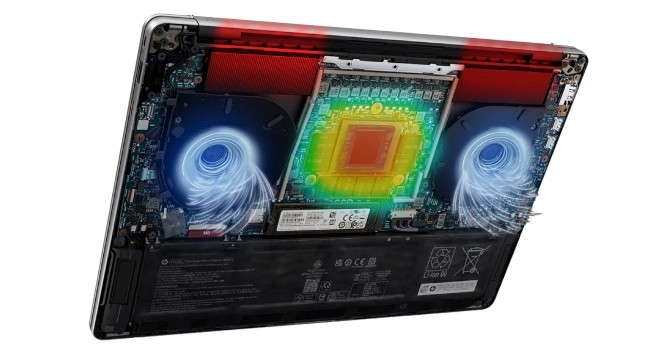
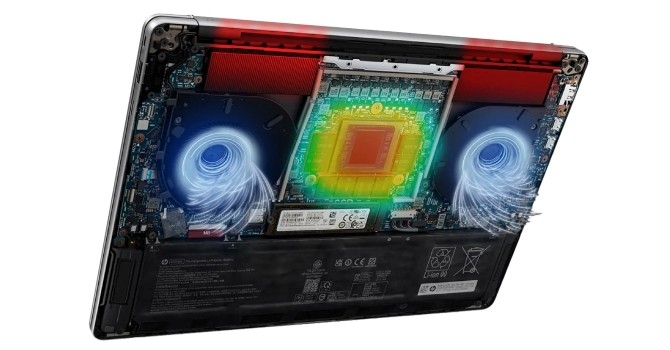
To keep that CPU strong, HP used a large vapor chamber that covers nearly two-thirds of the motherboard. Let’s find out if that’s enough to make this a truly worthy portable workstation.
Details
| Details | |
|---|---|
| Manufacturer: | HP |
| Model: | HP ZBook Ultra G1a 14 |
| Weight: | It starts at 1.568 kg |
| Processor: | AMD Ryzen AI Max+ PRO 395/Strix Halo 16 cores/32 threads up to 5.1 GHz, 64 MB L3 cache 55 W automatic TDP AMD Ryzen AI Max+ PRO 390/Strix Halo 12 cores/24 threads up to 5.0 GHz, 64 MB L3 cache 55 W automatic TDP AMD Ryzen AI Max+ PRO 385/Strix Halo 8 cores/16 threads up to 5.0 GHz, 32 MB L3 cache 55 W automatic TDP AMD Ryzen AI Max PRO 380/Strix Halo 6 cores/12 threads up to 4.9 GHz, 16 MB L3 cache 55 W automatic TDP |
| Chipset: | AMD Promontory/Bixby FCH |
| Display: | Display: Default Display: 14.0″/1920×1200 (16:10)/IPS/60 Hz ~400 nits/100% sRGB/Non-Touch Anti-Glare Optional display: 14.0″/2880×1800 (16:10)/OLED/120 Hz ~400 nits/100% DCI-P3 /Touchscreen Support for VRR/BrightView technology |
| Operating system: | Windows 11 Home/Pro/Business Ubuntu 24.04 LTS FreeDOS |
| Included Graphics: | AMD Radeon 8060S AMD Radeon 8050S AMD Radeon 8040S |
| Memory: | up to 128 GB of sold LPDDR5x-8000 |
| Storage: | 1× M.2 2280 PCI Express 4.0 x4 |
| Optical Drive: | Nothing |
| Communication: | 1× 10 Gbps USB Type-A/3.2 Gen. 2 1× 10 Gbps USB Type-C/3.2 Gen. 2 with DP 2.1 Alt Mode/PD 2× 40 Gbps Thunderbolt 4 with DP 2.1 Alt Mode/PD HDMI 2.1 Locking space Audio combo jack |
| Communications: | Wi-Fi 7 + Bluetooth 5.4 5MP IR web camera |
| Sound: | 4 speaker sound system developed by Poly Studio |
| Input device: | Microsoft Precision Touchpad with touch support Backlit keyboard |
| Power: | 1 × 140 W type C adapter 74.5 Wh battery |
| Guarantee: | Two years (depends on location) |
| MSRP: | Starting at $2747 for AI Max PRO 390 + 32 GB RAM |