
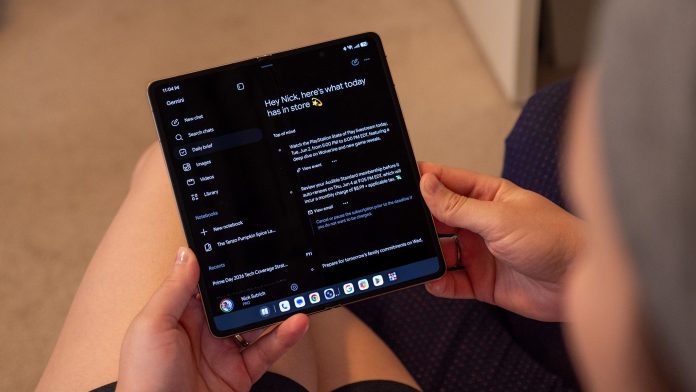

Every day after I wake up and make tea, I go back to bed and catch up on emails, messages, and I usually give myself 20-30 minutes to play some games before I dive into the day’s activities. Although I usually don’t like to spend a lot of time on my phone first thing, some days I’m more bothered by tasks than others. That is, until one day when the Gemini Daily Brief appeared in my notifications.
Now, I’m not a big fan of AI summaries or infotainment. Gemini and the other AI agents are cool, but they get so wrong it makes me want to ignore their existence. But Gemini Daily Brief is incredibly different, and it’s because of how Google presents calendar entries, emails, and other activities in a very efficient way.
The Daily Brief is one of the latest experiments that Google is using in an effort to make its users more comfortable using Gemini regularly, and if future efforts are as well thought out as this one, there is a real chance that my opinion and the use of Gemini will change significantly. It’s also a great way for the company to make its Gemini paid services feel important, since the Daily Brief is currently only available to people who subscribe to Google AI Plus, Pro, or Ultra.

What makes the Gemini Daily Brief special

Samsung and Google have both experimented with “daily notification” apps on their phones in the past two years. Samsung Now Brief, for example, pulls from resources on your phone, like the Samsung Health app, your calendar, Digital Activity, and more. While all is well, I have never found it useful to consolidate these sources into one place. Google even abandoned the Daily Hub after negative user feedback, and it looks like the company has taken everything it learned from these mediocre efforts and turned it into something more useful with the Gemini Daily Brief.
Meanwhile, Google’s recent Gemini updates are mostly focused on organizing the oodles of personal information you already have stored on the company’s servers. From email to to-do lists, chats, texts, photos, and search, most of us rely on Google for a significant portion of our internet usage, so it makes sense that the company’s AI assistant (Gemini) should be able to tap into those sources to deliver a personal web.
So while my Daily Brief may show me the latest emails, my newly published articles and YouTube videos, and actionable information for each job, yours may look very different. Google provides this list as a few examples:
- For students: Manage class schedules, organize study plans, and track applications.
- For entrepreneurs: Client emails can be activated and update task reminders.
- For parents: Manage school communications, track family history, and manage household chores.
- For job seekers: Act quickly on recruitment inquiries, prepare interviews, and monitor application statuses.
This deeply personal, customized nature makes it sound like Gemini understands you you and your needs. The most impressive part is that I didn’t have to modify anything to get it to personalize my Daily Brief like this. It just came out, and it sounds like for the first time Gemini is more than just a quick ChatGPT clone.
As I mentioned earlier, the Daily Brief is only available to paid Google AI subscribers. In addition, you will need to enable Personal Intelligence, then connect Gemini to Google Workspace and enable the Gemini Memory feature.
How does the Gemini Daily Brief work?
Every day, the Gemini Daily Brief will issue a notification in the morning that you can click to issue a report. The Daily Brief is officially “just” a Gemini chat, not a separate app or email, but it can be accessed anytime from the Gemini app. Here’s how to see it in action:
1. Open the Gemini app on your phone. It should be an icon in your app drawer.
2. In the Gemini app, tap the hamburger menu in the upper left corner, then tap Daily Brief.

It’s surprisingly easy to find, and the cool part is that you can do a lot of action on each character point that Daily Brief creates.
At the bottom of each item, click the three-dot menu to reveal additional actions. You can mark each task as complete (if applicable) or start a conversation with Gemini about that particular item. This section also shows the source of each item, so you can figure out where that one odd item might have come from.
Many objects have additional actions, usually indicated by a content button at the end of the object. For example, you may have an upcoming meeting about an important product review, and Gemini may suggest ideas to present ideas. Tapping that button will create a new dialog with a list of actions, usually consisting of several sections with different views.

This conversation thread gives you the ability to combine certain ideas into a new conversation, send the entire conversation to Google Docs, edit it in Gmail, and more.
You can also use the buttons below to provide feedback, which should improve future discussions and ideas from Gemini. If it’s more convenient, you can also tap the speaker button at the bottom of the conversation to have Gemini read the entire list of comments.
I’ve had a lot of success feeling more organized at the start of my day because of the Gemini Daily Brief, and I love how easy it is to look at the report at any time but also to get more information on certain things when I need it. Try it! I’m willing to bet you’ll love it too.