
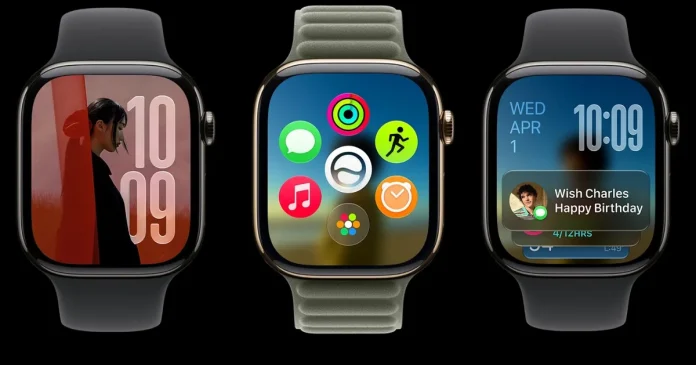

At WWDC 2026, Apple announced watchOS 27, bringing Siri AI, a new Siri app, a dynamic app grid, better Smart Stack suggestions, expanded fitness features, and new health tracking tools to the Apple Watch.
Apple Watch works best when it helps you do small things quickly without reaching for your iPhone. watchOS 27 builds on that vision with updates that make it easier to start workouts, find apps, unlock Wallet passes, and check important information on your wrist. Here’s what’s new.
Siri AI is a major improvement
One of the biggest additions to watchOS 27 is Siri AI, Apple’s next-generation assistant powered by Apple Intelligence. An improved Siri can understand personal context, answer complex questions, and take action across apps.
For Apple Watch, this improvement is very useful because the small screen makes typing and navigating apps more difficult. Siri AI allows users to ask more natural questions, get exercise suggestions, access information related to wellness, and conduct conversations directly from their wrist.
Siri can also extract personal information if needed. For example, it can help find a stored driver’s license number, a door code stored in Notes, or information from other personal content.

watchOS 27 comes with a dedicated Siri app. Users can continue conversations, start new conversations, revisit previous interactions, and pick up conversations started on the iPhone. Important conversations can be pinned for quick access. Assistant can also complete tasks within the apps, such as sharing flight details, playing a song recommended by an instructor, changing the goal of an exercise call, sending an email, restarting a podcast, or adding music to a workout playlist.
Siri AI is not available in the first beta release, but it is expected to arrive in the next beta update. Additionally, Apple Intelligence features will not initially be available on watchOS in the European Union due to the Digital Markets Act, and Siri AI will not be available in China at launch while Apple works through regulatory requirements.
The app grid and Smart Stack are getting smarter

The Apple Watch app grid now has a dynamic layout that highlights apps suggested by Siri, frequently used apps, and recently opened apps. For users with multiple installed apps, this update makes it easier to find and open the apps they use the most or might need at the moment. That said, accessing the entire app grid is now a two-step process instead of a single press of the Digital Crown.

Smart Stack is also more context aware. It can display widgets based on relevant conditions, such as birthday reminders, parking spots, bedtime alarm suggestions before selected holidays, and transit card information. There’s also a new Smart Stack touch. Users can double-tap their index finger and thumb together to open the Smart Stack, continue to double-tap to scroll, and use a single tap to open a selected widget.
Workout Buddy comes in handy
Workout Buddy received several improvements in watchOS 27. This feature now uses fitness history to deliver more personalized motivation during workouts. Instead of a standard prompt, Workout Buddy provides updates based on pace, distance, workout duration, and other performance metrics.

Apple also made the feature more flexible during workouts. Workout Buddy continues to work without users needing to carry their iPhone in their pocket or hand during exercise. However, this feature still requires an iPhone with Bluetooth enabled Apple Intelligence and headphones or speakers. Users also have the option to use Workout Buddy in Spanish
Indoor running and walking tracking is very accurate
Tracking indoor running and walking on treadmills is often more challenging than tracking outdoors since GPS data is not available. That’s why the new update includes improved motion tracking algorithms, which help the watch estimate treadmill distance more accurately using arm movement data.
Health tracking is enhanced with menopause support
Cycle Tracking has been part of the Apple Watch and Health app for several years, allowing users to log menstrual cycles, track symptoms, and get predictions about upcoming periods and fertile windows. The feature is designed to help users better understand changes in their reproductive health over time.

With watchOS 27, Apple is expanding Cycle Tracking with new support for perimenopause and menopause. The Health app can now alert users when missed cycle patterns may indicate a possible long-term menopause and offers symptom tracking tools and educational resources.
Find My finds an integrated app

The new Find My update brings all the location tracking features under one roof. Instead of using separate apps to locate people, Apple devices, and things equipped with AirTag, watchOS 27 combines Find Devices, Find People, and Find Things into one unified Find My app with a more map-centric interface. This is a great quality of life change for the app as now it only takes a few taps to keep track of everyone and all your stuff.
Wallet adds support for custom passes

Wallet is also very useful for everyday cards that don’t already have official Apple Wallet support. Users can create custom passes on their iOS 27 devices and sync them to the Apple Watch. For example, it can be used for membership cards that use QR codes or barcodes, such as library cards and gym memberships. These passes can be stored in Wallet and pinned to Smart Stack for quick access.
Call Context displays important information during calls
Business calls often require confirmation numbers, reservation information, or information hidden in Mail or Messages. watchOS 27 added Call Context to handle that. The feature displays important information while users are on the phone with the business. For example, a flight confirmation code stored in Mail can appear automatically during a call with an airline.
Liquid Glass and other small fixes
The Apple Watch display is small, so reading is more important here than on other Apple devices. The new software modifies Apple’s Liquid Glass design language with repeatable zoom effects and improved contrast, which should improve readability across notifications, widgets, controls, and apps.

Several minor improvements have been included as well. Playing music is now faster, step counts in the Fitness app sync more accurately with data from the Health app, and the watch can suggest battery-saving changes to help extend battery life. Apple has also made it easier to mute notifications, allowing users to select a notification and access the mute option in the lower right corner of the screen. Sleep tracking is said to be more accurate, although Apple has not yet shared specific details about the development.
Apple is also expanding safety features for children. With Child Accounts and Apple Watch for Your Kids, parents can set up a child’s Apple Watch without an iPhone, allowing the device to be used for communication and safety features.
Which Apple Watch models support watchOS 27?
watchOS 27 requires iPhone 11 or later, or iPhone SE (second generation) or later, running iOS 27.
Compatible Apple Watch models are:
- Apple Watch SE 3
- Apple Watch Series 9
- Apple Watch Series 10
- Apple Watch Series 11
- Apple Watch Ultra 2
- Apple Watch Ultra 3
The cutoff is tougher than usual. The Apple Watch Series 8, the first generation Apple Watch Ultra, and the Apple Watch SE (second generation) will not receive watchOS 27, even if they were supported by the previous major update. This means that Apple is drawing the line at watches equipped with an S9 or newer chip.
When can you download watchOS 27?
watchOS 27 will be released publicly to eligible watches this fall. The company has already made watchOS 27 available for developer testing. Siri AI will arrive in the upcoming watchOS 27 beta before its wider release later this year. A public beta is expected before the final release.
Installing developer software on a primary device carries risks. Apple Watch software is more difficult to roll back compared to iPhone or iPad software, so most users are better off waiting for a public beta or final release.